API Caching Strategies: Edge, Gateway, and Application Layers
Every API team eventually hits the same wall: a backend that's doing the same work over and over for requests that didn't need to reach it in the first place. A product catalog endpoint gets hammered by the same query a thousand times a minute. A pricing lookup recomputes an answer that hasn't changed in an hour. The fix is caching, but the harder question is where to cache, and what breaks when you get that wrong.
What Is API Caching?
API caching stores a copy of a response so that a later, equivalent request can be served from that copy instead of hitting the backend again. The goal is to cut server load and response times for data that doesn't change on every call.
That's the textbook definition, and it's also where most explanations stop. In practice, caching decisions differ a lot depending on where in the request path you apply them. A public product listing is a good candidate for caching at the edge, close to the reader. A per-user account balance is not, because caching it in the wrong place either serves stale numbers or leaks one customer's data to another. The rest of this piece works through those decisions layer by layer, then covers the two problems that make caching hard in practice: knowing when to invalidate and knowing when caching quietly breaks consistency.
Where to Cache: Edge, Gateway, and Application Layers
A single API request can pass through several caches before it reaches your backend, and each one serves a different purpose. Understanding what each layer is good at, and what it isn't, is most of the caching strategy conversation.
HTTP Cache Headers (Cache-Control, ETag): Client-Side Caching
The first caching decision happens before your infrastructure is even involved. What does the client do with the response it already has? HTTP defines this through response headers, primarily Cache-Control and ETag.
Cache-Control tells caches (browsers, proxies, CDNs) how long a response can be reused before it's considered stale, using directives like max-age and public or private. Per MDN's Cache-Control reference, a public response can be stored in a shared cache that's reused across multiple clients, while a private response should only be cached by that one client, which is the directive to reach for whenever a response includes anything personalized.
ETag handles the case where a cached response might be stale but you'd rather confirm that than blindly refetch. As MDN's ETag reference describes it, an ETag is a version identifier for a resource that lets a server avoid resending a full response when the content hasn't actually changed. The client sends the stored ETag back in an If-None-Match header, and the server replies with a lightweight 304 Not Modified if nothing has changed, or a fresh 200 OK with the new version if it has.
Client-side caching is cheap and effective, but it only helps the client that made the original request. It doesn't reduce load on your infrastructure for the next different client asking for the same thing. That's where the next layers come in.
CDN and Edge Caching
A CDN sits between your users and your origin infrastructure, caching responses at points of presence physically closer to the requester. For an API, this mostly pays off for read-heavy, non-personalized endpoints: public reference data, catalog listings, anything served identically to many callers.
Edge caching is a shared cache in the sense described above. One cached copy serves many requests, which is exactly why it's a poor fit for anything scoped to an individual user or account. Rate limiting, geographic routing, and TLS termination often live at this same layer, so caching decisions here tend to get bundled with other edge-level policy rather than treated in isolation.
API Gateway Caching
Between the edge and your backend services, the API gateway is often the most practical place to cache, because it's the one layer that already sees every request with full knowledge of the API contract: which operation was called, with which parameters, under which subscription or plan.
Gateway-level response caching stores the backend's response against a cache key built from the request (typically the path, method, and relevant parameters or headers), and serves that stored response for matching requests within a configured timeout. This is useful when the backend computation is expensive relative to how often the underlying data actually changes, for example a search endpoint over a catalog that's rebuilt a few times a day. Because the gateway is already in the request path for every API call, adding caching here doesn't require touching client code or introducing a new piece of infrastructure. Whether a given gateway ships this as a built-in policy or expects you to add it yourself varies by product, so it's worth checking your own gateway's policy catalog rather than assuming it's there by default.
The trade-off is the same one that shows up at every layer. Someone has to decide the timeout, and that decision is a bet on how quickly the underlying data changes.
Application-Level Caching (Redis, Memcached)
The deepest layer is inside your application itself, usually backed by an in-memory store like Redis or Memcached. Instead of caching the full HTTP response, application-level caching typically stores the result of an expensive operation (a database query, a computed aggregate, a session lookup), keyed however the application logic finds useful.
This is the most flexible layer because it isn't limited to whole-response caching. You can cache a fragment of a response, share a cached value across multiple different API operations that all need it, or apply cache-aside logic where the application checks the cache first and falls back to the database on a miss, writing the result back for next time. It's also the layer with the most operational responsibility. You own the cache server, its memory limits, its eviction policy, and its failure behavior when it isn't available.
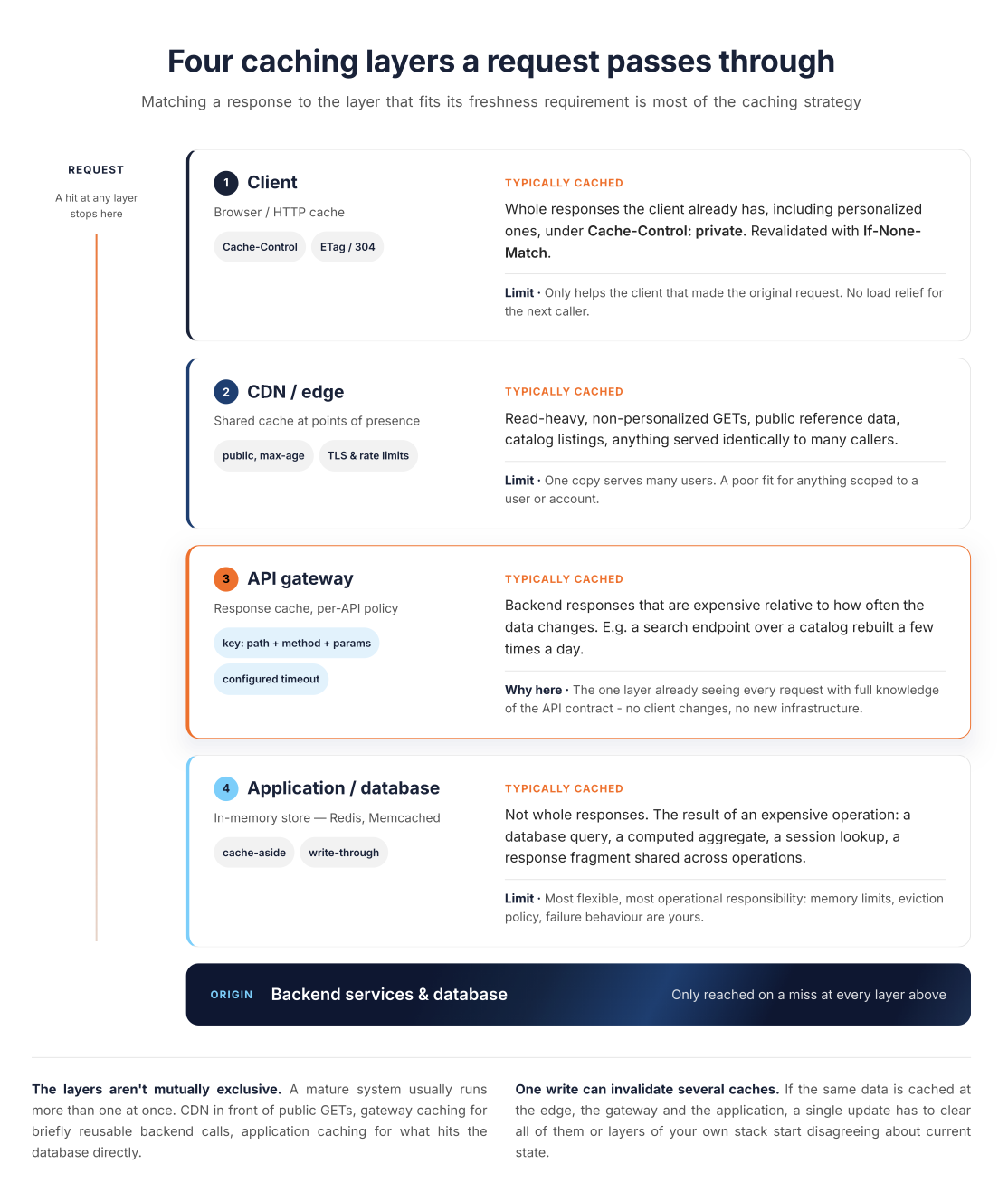
The layers above aren't mutually exclusive, and a mature system usually runs more than one at once: a CDN in front for public GET endpoints, gateway-level caching for backend calls that are safe to reuse briefly, and application-level caching for the parts of the request that hit a database directly.
The above diagram shows the simplified fresh-cache-hit path. A request that matches a valid, unexpired entry at some layer stops there. It doesn't depict conditional revalidation: when a cache holds a stale entry (one past its freshness lifetime), a client or intermediate cache can still send a lightweight conditional request (an ETag in If-None-Match, or a Last-Modified date in If-Modified-Since) that reaches the next layer for a 304 Not Modified check, rather than a full recomputation. That path still touches the layer above the origin even though nothing is recomputed.
Cache Invalidation: The Hard Part
Deciding what to cache is the easy half of the problem. Deciding when a cached value is no longer valid is the half that actually causes incidents.
The most common approach is a time-based expiry, a TTL, after which the cached value is treated as stale regardless of whether the underlying data changed. This is simple to reason about and requires no coordination between the system that writes data and the system that caches it, but it means there's always a window, however short, where a cache can serve an answer that's already wrong.
The alternative is active invalidation, explicitly clearing or updating a cache entry at the moment the underlying data changes. This is more accurate, but it requires every code path that writes the data to also know about the cache and clear the right key, which is a coupling that's easy to get right at first and easy to miss later as the system grows. Distributed systems make this harder: if the same data is cached in multiple places (edge, gateway, and application layer), a single write has to invalidate all of them, or you end up with different layers of your own stack disagreeing about the current state.
A related failure mode is the cache stampede. Many cached entries expire around the same time (a common TTL, a deploy that clears a shared cache), and the resulting flood of near-simultaneous requests all miss the cache and hit the backend at once, which can look like a self-inflicted denial-of-service. Techniques like staggering TTLs, request coalescing (only letting one request rebuild a given key while others wait for that result), or serving a stale value while a background refresh runs are the common mitigations. None of them eliminate the risk. They reduce how often it turns into an incident.
When Caching Breaks Consistency
Every caching decision is a trade-off between performance and freshness, and it's worth being explicit about where that trade-off actually breaks something rather than just costing a little accuracy.
- Stale reads: These are the most direct consequences. A client reads data that was true a moment ago but has since changed. For a lot of API responses (product descriptions, articles, reference data), this is harmless. For others (an inventory count, an account balance, a permission check), a stale read can lead to a user acting on information that's already wrong, which is a functional bug, not just a minor delay.
- Read-after-write consistency: This is the specific case where a client writes data and then immediately reads it back, expecting to see its own update. If the read path is served from a cache that hasn't been invalidated yet, the client sees the old value right after writing the new one, which tends to look like a bug in the application rather than a caching decision, because from the client's point of view it just wrote something and got told it doesn't exist.
- Mixed public and private data: This is a narrower but more serious failure. It happens when a response is cached at a shared layer (a CDN or gateway cache) when part of that response was actually personalized to one user. If the cache key doesn't account for identity or authorization, the second user's request can be served the first user's cached, personalized response. It's worth being precise about what fixes this and what doesn't.
Cache-Control: privateis an HTTP directive that forbids a shared cache from storing the response at all. Per RFC 9111, it's not an access-control or encryption mechanism, and adding a user ID to a cache key doesn't override it or make storage in a shared cache safe. If you actually need to reuse a personalized response across a given identity's own requests, that's a different deliberate design: an identity-scoped cache at your application or gateway layer, one that checks authorization before serving a cached entry and includes tenant or resource context in its key, kept separate from any shared HTTP cache. This is a data exposure issue, not just a staleness issue, which is whyCache-Control: privateand cache-key design deserve more attention than they usually get.
None of this argues against caching. It argues for choosing TTLs and invalidation strategies based on how much a stale answer actually costs for that specific endpoint, rather than applying one caching policy uniformly across an API surface that mixes low-stakes and high-stakes data.
API Caching Best Practices
A few patterns show up consistently in caching that holds up under load, rather than caching that works until the first busy day:
- Cache the resources that are actually frequently accessed and slow to compute. Caching cheap, rarely-called endpoints adds operational surface area for very little benefit.
- Never cache mixed public and private data in a shared cache. If a response includes anything user-specific, mark it private, so it's excluded from any shared HTTP cache. If you need to reuse it across a given identity's own requests, build that as a separate identity-scoped cache at your application or gateway layer, one that checks authorization and keys on tenant or resource context, rather than relying on the same shared cache with an identity value folded into its key.
- Choose cache-aside for read-heavy, tolerant-of-staleness data, where the application checks the cache, falls back to the source on a miss, and writes the result back. Choose write-through when the application can't tolerate even a brief cache miss on data it just wrote, at the cost of extra write latency, though write-through only guarantees the entry is there immediately after the write. It doesn't guarantee there's never a later miss. Entries can still expire, be evicted under memory pressure, or be lost if the cache restarts.
- Set TTLs based on how often the underlying data changes, not on a single default applied everywhere. A catalog that's updated nightly can tolerate a much longer TTL than a pricing endpoint that updates hourly.
- Treat cache keys as an implementation-level correctness contract. A cache key that omits a parameter the response actually depends on will serve the wrong cached response to some fraction of callers, quietly, until someone notices the wrong data. This is distinct from how a response varies for consumers of your API. If a response legitimately differs by a request header (encoding, authorization, an API version header), that's a public signal worth documenting for callers, typically via a
Varyheader or in your API docs, separately from the internal cache key your infrastructure happens to use. - Monitor cache hit rate and staleness incidents separately. A high hit rate with no visibility into how often stale data was served is only half the picture.
Real-world systems that operate at scale (large e-commerce catalogs, social platforms with heavy read traffic) generally combine several of these layers rather than relying on one. The pattern is less "pick the right cache" and more "match each part of the response to the caching layer that fits its actual freshness requirement."
How WSO2 Supports Caching for API and AI Traffic
The caching decisions above apply whether you're running your own gateway logic or using a managed one, but it's worth being specific about what a gateway can and can't do for you, and about the difference between caching ordinary API traffic and caching AI traffic, since the two are architecturally distinct problems.
Here it's worth being precise about what's actually documented, rather than assuming caching works the same way for every kind of traffic. For conventional REST, GraphQL, and WebSocket traffic, WSO2's API Gateway's current policy set covers authentication, rate limiting, payload transformation, and content moderation. A general-purpose response-caching policy isn't part of that documented set, so if gateway-level response caching, as described earlier in this piece, matters for your REST or GraphQL APIs, check your gateway's own policy catalog rather than assuming it ships by default. LLM and AI traffic is a different case, and this is where the platform does ship a documented caching capability.
Caching gets a different shape entirely when the traffic is outbound calls to an LLM provider rather than inbound calls from an API client. Exact-match caching doesn't help much there, because two requests that ask the same question in different words look completely different as strings. WSO2's AI Gateway addresses this with a semantic caching capability. It embeds an incoming prompt, checks it against previously cached prompts using vector similarity, and returns the cached response when a sufficiently similar request has already been served, rather than requiring an identical string match. The policy attaches to a single LLM proxy or to a whole provider so every proxy using it gets the same cache, and the similarity threshold is a deliberate trade-off to set with care: too loose, and the gateway will answer one question with a different, previously cached question's response. Because this operates on outbound calls to the model provider, it's a separate concern from the inbound response caching described above, one that specifically targets the cost and latency of repeated or rephrased LLM queries. WSO2 documents this as a semantic caching policy within its AI Gateway, and the underlying concept is covered in more general terms in WSO2's overview of semantic caching.
Similarity alone isn't a safety guarantee. Two prompts can be close in meaning and still deserve different answers, so a semantic cache needs boundaries beyond the similarity score itself. These include who's asking (tenant and authorization boundaries, so one customer's cached response is never served to another), what the request is sent against (the same wording against a different model or a different system prompt is effectively a different request), what context was retrieved for it (RAG results that change the grounding of the answer), how fresh the underlying data needs to be, and whether the request is sensitive or state-changing, in which case it generally shouldn't be served from a similarity match at all, regardless of the score. This isn't specific to any one vendor's implementation. It's a property of semantic caching in general, and it's worth treating as a design requirement rather than something a similarity threshold alone resolves.
The practical trigger for reaching for semantic caching isn't a specific traffic volume. It's whether your application is fielding repeated or paraphrased questions against the same underlying model, whether you're routing across multiple LLM providers and need cost visibility that's consistent across them, or whether you're already managing API and AI traffic under the same control plane and want caching policy to live alongside the rest of your governance rather than in a separate tool.
Conclusion
Caching is one part of a larger API architecture picture, alongside how you design the gateway layer itself, how you handle authentication, and how you structure the rest of your request path. If you're working through those decisions as a set rather than one at a time, the WSO2 API Architecture learning hub is a reasonable place to see how caching fits alongside gateway design, resilience patterns, and the rest of the architecture stack. And if you're evaluating semantic caching for your own LLM traffic, WSO2's AI Gateway documentation covers how the Semantic Cache policy is configured on an LLM proxy or provider.
Frequently Asked Questions
How does API caching work?
A caching layer (client, CDN, gateway, or application) stores a previous response and serves it again for a matching later request, instead of recomputing or refetching it from the backend.
Can an API gateway do caching?
Most API gateways support response caching as a configurable policy, storing a backend response against a cache key built from the request and serving it for a set timeout.
What are the cache scopes in HTTP?
There are two cache scopes: private, meaning only the single client that received the response may store it, and shared (or public), meaning the response can be reused across multiple clients, as in a CDN. Cache-Control: no-store is a separate directive, not a third scope. It prevents a response from being stored in any cache at all, private or shared.
How is caching different for LLM or AI API traffic?
Traditional caching matches against a defined cache key, which can combine or normalize several fields, but it's still an exact match on that key, which rarely applies to natural-language prompts. Semantic caching instead matches on meaning, using vector similarity, so differently-worded requests with the same intent can still be served from cache.

