Internal Developer Portal: What It Is and How to Build One
An internal developer portal (IDP) is a centralized, self-service interface where developers discover services, documentation, APIs, and workflows within their organization. It exists to cut down the time developers lose navigating fragmented tools and tribal knowledge. As engineering teams grow past a handful of services, that navigation problem stops being a minor annoyance. It starts showing up in onboarding time, deployment velocity, and how often the same question gets asked in Slack.
But a portal and a platform are related, not identical, and the difference matters for how you plan a build. Confuse the two, and you risk building a polished front end for capabilities your organization hasn't actually built yet.
Portal vs. Platform: A Distinction Worth Getting Right
This is one of the most persistent points of confusion in the space, and IBM and Platform Engineering both call it out independently as the thing worth clarifying first. The portal is the interface layer, the place developers go to discover a service, request an environment, or check whether their code is production-ready. The platform underneath is the engine that actually does the work: provisioning infrastructure, running deployments, managing secrets, and orchestrating delivery pipelines. IBM frames it plainly, the platform is the environment that hosts your tools, and the portal is how developers find, learn about, and use them.
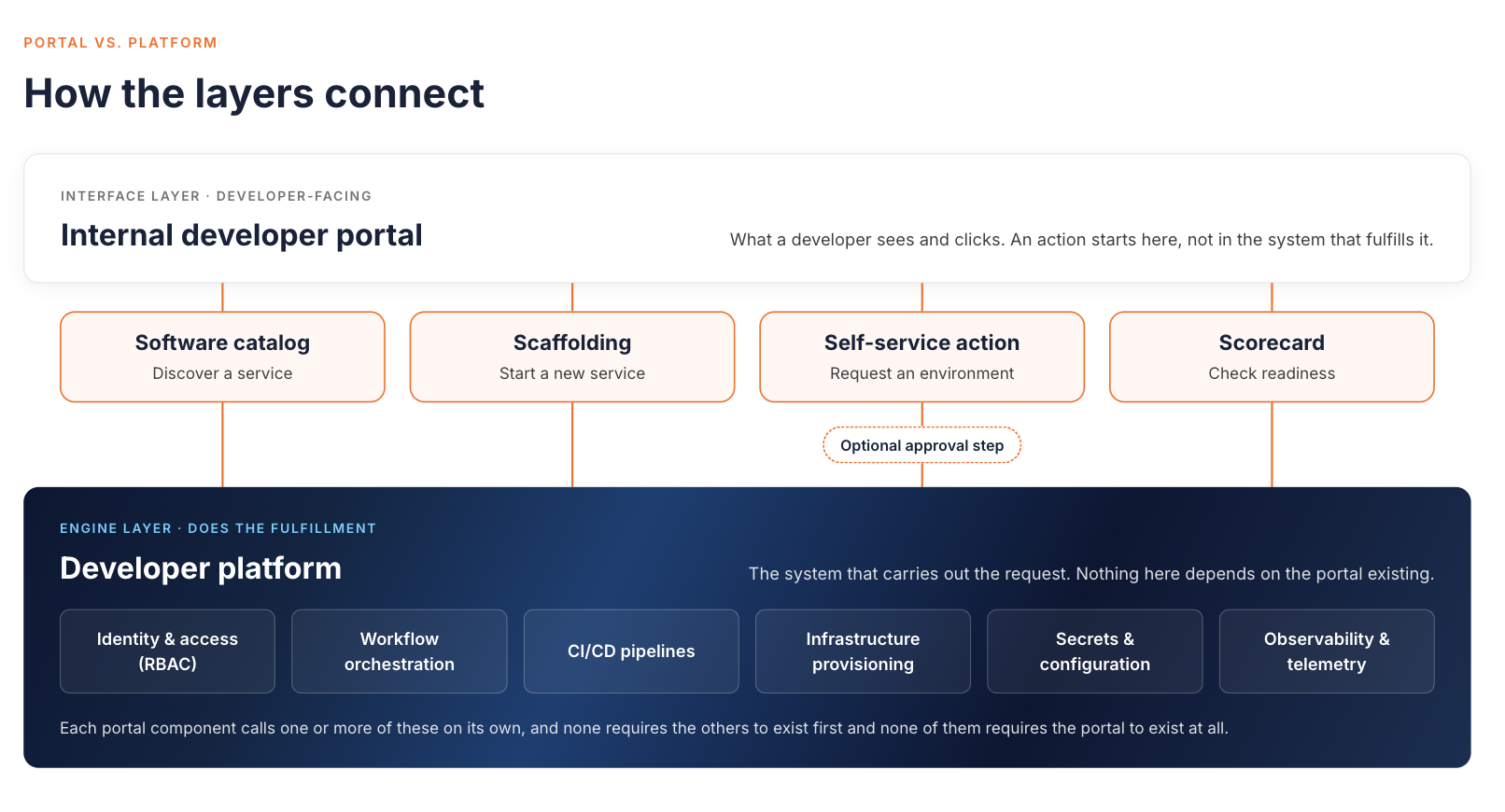
A portal doesn't need a fully built-out platform underneath it before it adds any value, but it does need something real behind each button it shows. The failure mode worth watching for is a self-service action with no automation behind it at all, not one that includes a deliberate human approval step. A request that needs sign-off before an automated action fires is still self-service. A request that always turns into a person doing the work by hand, with no automation triggered anywhere in the process, is the facade. Picture a developer clicking "provision a staging environment" in a shiny new portal, only to find out the request always lands with a person to fulfill manually, no matter who approves it. The button exists. The automation behind it doesn't. That gap is where a lot of internal portal projects go wrong. It's also where a vendor's positioning matters. Some products are portal-only, and some bundle the portal with platform automation underneath it. Keep that distinction in mind. It sets up almost everything else in this piece.
What an Internal Developer Portal Solves
Developers at a growing engineering organization typically juggle a Git provider, a CI/CD dashboard, a cloud console, a documentation wiki, and a list of Slack threads. They need all of that just to answer basic questions. Who owns this service? How do I get a new environment? What's the current deployment status? None of that is a technology problem exactly. It's a discovery problem, and it gets worse as headcount and service count grow.
A portal consolidates discovery and self-service into a single interface. Instead of asking around or digging through five different systems, a developer opens the portal. They find the service they need and see who owns it. Then they read the documentation or start a self-service action directly. Platform Engineering's own analysis of the space frames this as reducing cognitive load. That phrase shows up across the industry because it's the most concrete way to describe what the portal is for. Developers spend less time hunting and more time building.
Core Components of an Internal Developer Portal
IBM's and Platform Engineering's breakdowns of this space are the two most detailed available. They converge on nearly the same list of core building blocks. That is a strong signal these are the real load-bearing pieces, not marketing categories. The first two are foundational, the kind of thing a portal needs from day one. The second two typically get added once the portal is established:
- Software catalog (foundational): A registry of services, owners, APIs, and documentation. This is the map. Without it, developers can't tell what exists, who's responsible for it, or what it depends on.
- Scaffolding and software templates (foundational): Standardized starting points, sometimes called "golden paths," that give a developer a working service skeleton that follows your organization's baseline configuration, instead of a blank repository.
- Self-service actions (added as the platform matures): Provisioning an environment, requesting a resource, or triggering a deployment without filing a ticket and waiting on another team.
- Scorecards (added as the platform matures): A way to measure whether a service meets your organization's bar for production readiness, security posture, and compliance. You see that status at a glance instead of auditing it manually.
A mature portal eventually benefits from all four, but they don't need to launch together. A catalog with no scaffolding still leaves developers copying and pasting from whatever service looks closest to what they need, which is exactly the kind of inconsistency a portal is supposed to prevent. Self-service actions with no scorecards mean services get deployed fast, with no visibility into whether they meet your standards once live. That trades one problem (slow provisioning) for another (unmonitored drift from your production-readiness bar). Neither of those is a reason to hold off on shipping a catalog-only first version, covered in the build steps below. It's a reason to plan for the other two rather than treat the first release as finished.
None of these four components requires the others to exist for the portal to add some value. A catalog on its own is already useful. But the components reinforce each other, and a portal built around only one or two of them tends to plateau quickly, solving an initial pain point without addressing the ones right behind it.
How an Internal Developer Portal Differs from a Service Catalog or CMDB
The terms get used loosely enough that it's worth drawing a clean line between them, because each one serves a different audience for a different purpose.
| Internal developer portal | Service catalog | CMDB | |
|---|---|---|---|
| What it is | The interface developers and platform engineers use to discover and act on services | The underlying registry of services, owners, APIs, and documentation | IT's database of configuration items and asset relationships |
| Primary audience | Developers and platform engineers | Developers, and sometimes downstream consumers of a service | IT operations, security, and compliance teams |
| Main job | Reduce cognitive load and enable self-service | Maintain accurate, current information about what exists | Support incident response, change management, and compliance audits |
A service catalog is typically a component the portal surfaces, not a separate destination developers go to on their own. A CMDB, by contrast, usually isn't built for developers at all. It's built for the people who need to trace a production incident back to a specific configuration item or prove compliance during an audit. The three overlap in the sense that they all track something about your systems, but conflating them leads to buying (or building) the wrong thing for the wrong audience.
The Portal Market: Build vs. Buy
Platform Engineering's research on the space breaks the market into four categories, and it's a genuinely useful way to frame the decision rather than treating "build vs. buy" as a binary:
- Standalone Backstage providers, who help you deploy and customize the open-source framework.
- Proprietary portal vendors, who build a dedicated portal product from scratch.
- DevOps platforms that bolt portal features onto an existing tool suite.
- Bundled offerings that combine the portal interface with the platform capabilities underneath it in one product.
Backstage deserves specific mention because it's the dominant open-source option, originally built at Spotify and now a CNCF incubating project, with a wide base of adopters. But it's a framework, not a finished product. Teams that expect it to work out of the box are often disappointed. Platform Engineering's own research on the space describes a common pattern. A team stands up Backstage and discovers it needs ongoing plugin development and maintenance to do anything useful. The team scales back its investment before getting much value out of it. How quickly that happens varies by team.
Building a platform from scratch has real tradeoffs. Product launches slow down, and infrastructure and delivery workflows take effort to get right. The work needs specialized skills and a dedicated team with ongoing cost. None of that means building is always the wrong call. It means the tradeoff is worth naming honestly before you commit a team to it.
Common Mistakes When Building an Internal Developer Portal
A few failure patterns show up often enough to be worth naming directly.
Treating a framework like Backstage as plug-and-play
It isn't. Backstage gives you a foundation, not a finished product, and getting it to reflect your actual services and workflows takes ongoing plugin development and maintenance. Budget for that as a standing commitment, not a one-time setup project.
Building the portal before the platform
This is the mistake that matters most, because it directly follows from the portal-vs-platform distinction above. A portal interface can't offer self-service capabilities that don't exist yet in the underlying system. If developers can request an environment through the portal but nothing actually provisions it, you've built a facade, and the trust you lose when developers discover that is hard to win back.
Ignoring how developers already work
A portal that doesn't integrate with the Git provider, CI system, and Kubernetes setup your developers use every day gets ignored, no matter how polished the interface is. Developers will keep using the tools that already work rather than adopt a new destination that duplicates what they can already do faster elsewhere.
Skipping user research
It's tempting for a platform team to build what they assume developers want. Talking to the people who'll actually use the portal before building it, and asking specifically where their current workflow breaks down, tends to prevent a lot of wasted effort on features nobody asked for.
How to Build an Internal Developer Portal: A Practical Starting Point
- Map current platform maturity: Before designing any interface, take stock of the self-service and catalog capabilities that already exist. Work out where service records could come from, such as your Git provider, CI system, or cloud resource tags. A spreadsheet someone updates by hand is not a good source. A portal built on top of nothing just makes the gaps more visible.
- Talk to stakeholders early: Developers are the primary users, but operations, security, and architecture teams interact with the portal too, and their requirements shape what it needs to support.
- Decide build vs. buy: Weigh standing up Backstage or a similar framework against a commercial or bundled platform-and-portal option, using the four-category framework above as a starting point. The honest question to ask is whether your team has the ongoing capacity to maintain a framework, or whether that capacity is better spent on the product you're actually building.
- Start small: A minimum viable portal with just a service catalog and basic templates is a reasonable first release. Give the catalog one clear owner and a defined source for its records, so it stays accurate enough that developers actually trust it. From there, add one self-service action, something like spinning up a new environment, with basic role-based access controls in place, before expanding to scorecards and broader automation in later phases.
- Treat it as a product: Give it a dedicated owner, track adoption over time, and iterate based on what developers actually use rather than what seemed useful at launch. A portal nobody owns tends to drift out of date within a few months, at which point developers stop trusting it and go back to asking around.
The trigger for starting this work isn't a specific team size or a fixed number of services. It's the point where developers are routinely blocked waiting on another team. Nobody has a reliable answer to "who owns this." Onboarding a new engineer takes weeks instead of days, because so much knowledge lives in people's heads instead of in documentation.
Internal Developer Portals for API-Heavy Organizations
In some organizations, APIs are effectively the internal product, and one team's service is another team's dependency. There, the portal's job goes beyond CI/CD self-service. The API catalog and documentation matter just as much as the deployment tooling. The people discovering and consuming those APIs are other internal teams, not just the platform team that maintains the portal.
That's a natural point where platform engineering and API management overlap. A portal that only tracks deployment pipelines but has no coherent view of who's calling which internal API, with what contract, is missing half the picture for an API-heavy organization. Picture a team that wants to change a response field on an internal API. A catalog only helps here if its dependency data is current and complete. It should be built from declared relationships, automated discovery, and real traffic telemetry. A one-time manual entry quietly goes stale. Get that right, and the catalog is what lets a team check who actually consumes a given API before shipping a change, instead of finding out after something downstream breaks. Get it wrong, and a stale or incomplete catalog creates false confidence, which is arguably worse than having no catalog at all. The catalog component covered earlier needs to extend to API ownership and documentation specifically, not just service metadata in general.
How WSO2 API Platform Fits API-Heavy Organizations
The WSO2 API Platform is not an internal developer platform bundle. It covers the API side of this picture. Its API Portal and MCP Hub give teams one catalog for internal APIs and MCP servers. Developers can search APIs, read documentation, create applications, subscribe, and manage API keys in one place. The portal also supports AI agents directly, through an llms.txt endpoint, an MCP registry, and Arazzo workflows. The portal runs in API Platform Cloud or self-hosted. APIs discovered on federated gateways, such as AWS API Gateway, can appear in the same portal.
The platform's Moesif-powered analytics show top applications and unique consumers, and you can filter them by API. That is the kind of traffic telemetry a catalog needs to show real consumers, instead of relying on manual entries.
None of this replaces the work in the earlier sections of this piece. The market-category framework and the build-vs-buy tradeoffs still apply. What the API Platform adds is a governed catalog for the APIs and MCP servers that internal teams depend on.
Conclusion
The portal and the platform solve different problems, and building them in the wrong order is the single most common way these projects stall. Get the underlying platform capabilities in place first, then layer the portal interface on top of them. From there, pick a market category that matches your team's capacity to build and maintain it. The options are a standalone framework like Backstage, a proprietary portal vendor, a DevOps platform with portal features, or a bundled platform-and-portal offering. For the API catalog piece, look at how the WSO2 API Platform's API Portal handles discovery, subscriptions, and MCP servers.
Frequently Asked Questions
What is an internal developer portal?
An internal developer portal is a web interface developers use to discover services, documentation, and self-service actions across an organization's tooling. It sits on top of an internal developer platform rather than replacing it.
How do internal developer portals improve developer experience?
They cut the time developers spend searching for information or waiting on another team. They bring a software catalog, templates, self-service actions, and scorecards into one interface. That interface sits on top of the underlying platform's automation.

