Agent API Permissions: Identity, OAuth & Access Control
An expense agent needs to read receipts, look up a cost center, and submit a claim. A common shortcut is to give it a long-lived API key for the whole finance API instead. In Teleport's 2026 Infrastructure Identity Survey, 70% of organizations reported giving AI systems more access than a human would get for the same task.
This guide covers how to scope agent API permissions in 2026. It walks through agent identity, scoped and short-lived tokens, delegated access, and audit. It also shows how the OAuth grant changes when no user is at the keyboard. Several of the standards involved are still drafts, so the guide flags where practice is settled and where it is not. The final section shows how WSO2 Agent ID implements each layer.
Why AI Agents Need a Different Permission Model Than Users
AI agents need their own permission model because their access needs change per task, not per job function. Role-based access control works well as a baseline, but on its own it assumes a stable role. An agent may read customer records for one request and issue a refund for the next. Permissions have to follow the task, the context, and the delegating user.
Shared static API keys fail for a different reason. A key issued to one workload can identify that workload. A key shared across agents identifies only a credential. It cannot tell you which agent made a call, or on whose behalf. Roles alone fall short because they are sized for the job. A role that covers every task an agent might attempt is broad by default, and least privilege needs task and context constraints on top of that baseline.
Take a support agent that answers billing questions. It needs read access to invoices. Once in a while, it also needs to issue a credit. If the credit permission sits in its role permanently, any prompt injection that reaches the agent can try to issue credits too. The agent also chooses its tool calls at runtime. So the exact set of calls is not knowable when you provision it. Scoped, per-task authorization is one of the properties of an agent-ready API, alongside clear contracts and safe retries.
The Three Anti-Patterns That Get Agent Permissions Wrong
Auth0 has described three anti-patterns that show up repeatedly in agent deployments. Each one is a shortcut that works in a prototype and causes trouble in production.
Embedding long-lived credentials directly in the agent
A static key copied into an environment variable or config file often has no expiry set, and every run of the agent shares it. Agents raise the stakes, because a manipulated agent can be talked into revealing what it can read. The OWASP MCP Top 10 lists hard-coded credentials and long-lived tokens under MCP01, Token Mismanagement and Secret Exposure. When a static key leaks, revocation means finding and rotating every copy.
Inheriting the full scope of the user's OAuth token
Reusing a broad user token gives the agent everything that token allows. OAuth tokens can be limited by scope, audience, lifetime, and client, but a token issued for a user's own session is often broad. If an administrator's broad token reaches the agent, every tool call it makes carries administrator rights. The agent usually needs one or two scopes. The MCP specification addresses a related problem at the server side. An MCP server must not pass through the token it received to an upstream API. The same principle applies to agents in general. Each hop should carry a token issued for that audience. Issue a token for the intended resource and task with the minimum necessary scopes. Where supported, preserve the initiating user as the subject and the agent as the actor. The resource server should then validate both the scopes and the audience.
Giving the agent effective superuser access "to be safe"
Teams often grant broad access to stop tool calls from failing during testing. That permission set then ships to production unchanged. Auth0 calls this the most damaging of the three. The blast radius is every system the agent can reach, at system level rather than at the level of one user.
Identity, Authorization, and Execution Are Three Separate Layers
A permission check answers three questions: who is calling, what that caller may do right now, and whether the tool enforced the answer. These map to three layers, and each one usually has a different owner.
- Identity layer: An identity provider registers the agent as its own principal. It holds the agent's credentials and metadata, such as owner and purpose, and it issues tokens.
- Authorization layer: Policies decide which scopes a token carries. An enforcement point, such as a gateway or the API itself, checks those scopes on each request. It typically validates signed tokens against the issuer's published keys, so the identity provider stays out of the request path.
- Execution layer: The API or MCP server performs the action. It also applies resource-level checks, such as whether an invoice belongs to the customer in the request. Tools are easier to scope when their APIs have machine-readable descriptions agents can discover.
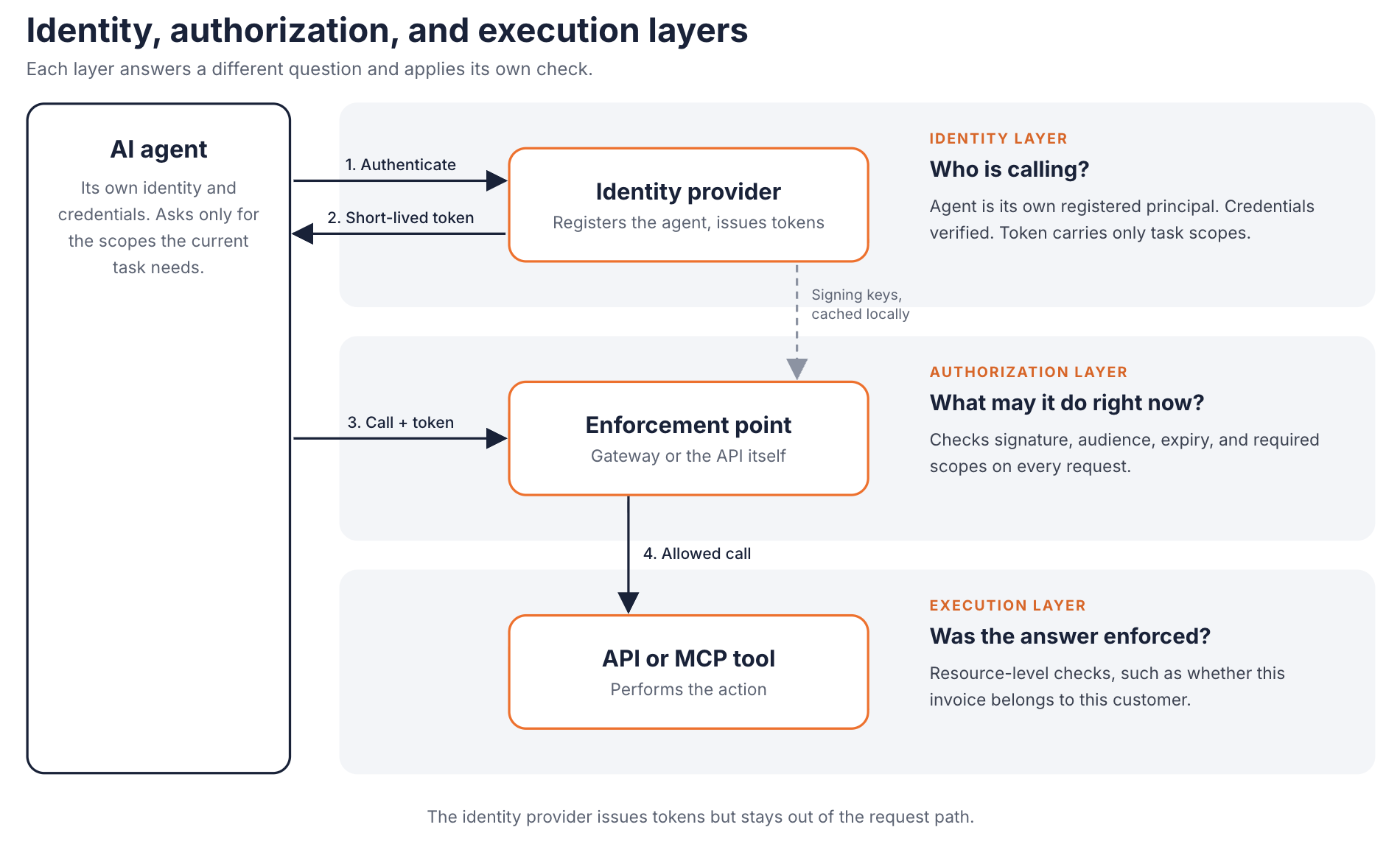
Each layer answers a different question and applies its own check. The identity provider issues tokens but stays out of the request path.
Token issuance and request handling are separate flows. The agent obtains a token before it calls anything. At request time, the token travels with the call. The enforcement point and the tool each apply their own checks, and neither needs to call the identity provider on every request.
Across the agent's lifetime, the same layers support four functions. You administer the agent's identity from provisioning to decommissioning. You authenticate it without a human typing a password. You authorize each action against policy. You audit what it did. WSO2 Agent ID, covered in the final section, organizes its features around these four functions.
Scoped, Short-Lived Credentials: Capability and Task Scoping
Scoping an agent has two dimensions, and they solve different problems.
Capability scoping
Defines what kinds of actions an agent may ever take. A billing agent might hold invoices:read and credits:create, and nothing that touches payroll. You set this when you register the agent, usually through roles or entitlements on API resources. Name scopes after resources and verbs rather than after agents. A scope called support-agent-access hides what it grants, while invoices:read stays meaningful when a second agent needs the same capability.
Task scoping
Narrows that set for a single task. The agent requests only the scopes the current task needs, for the audience it is about to call. The MCP authorization specification follows this pattern for MCP servers. Tokens are bound to one server, and servers must reject tokens issued for any other audience.
Short lifetimes limit the blast radius when a token leaks. Anthropic's Workload Identity Federation for the Claude API is a concrete example. A federation rule can set a token lifetime from 60 to 86,400 seconds, with a default of 3,600. The minted token lasts for the rule's lifetime or twice the remaining lifetime of the identity token the workload presented, whichever is shorter. So it cannot long outlive the upstream identity it came from.
Short lifetimes have a cost. The token endpoint becomes a runtime dependency, so plan for refresh before expiry rather than on failure. Two related controls are worth adding:
- Refresh tokens stay out of the model's context: Interactive agents often need refresh tokens to keep working without asking the user again. Store them in a backend credential store, and rotate them. The MCP specification requires refresh token rotation for public clients.
- Sender-constrained tokens resist replay: DPoP (RFC 9449) binds a token to a key the agent holds. A stolen DPoP-bound token is not usable on its own, unlike a plain bearer token.
Delegated Access vs. Direct Access: Two Different Authorization Shapes
With direct access, the agent acts as itself. The token's subject is the agent, and policy evaluates the agent's own entitlements. A nightly reconciliation job that compares ledgers works this way.
With delegated access, the agent acts on behalf of a user. The token carries the user as the subject and the agent as the actor. RFC 8693 defines the act claim for this purpose. The resource server can then require both conditions. The user must hold the permission, and the agent must be allowed to use it. A booking assistant that reserves flights for an employee is a typical case.
The grant type depends on who acts and whether the user is in the session:
| Agent type | Grant type | User present at request? | Typical use case |
|---|---|---|---|
| Autonomous agent acting as itself | Agent's own credentials (for example, client credentials or JWT bearer, RFC 7523) | No user involved | Monitoring, pipelines, scheduled jobs |
| Interactive agent acting for a user | authorization_code with PKCE, plus refresh_token | Yes, in the session | Copilots and chat assistants |
| Background agent acting for a user | Refresh token within earlier offline consent, or CIBA (urn:openid:params:grant-type:ciba) for fresh approval | Not in the agent's session. With CIBA, approves asynchronously on a separate device | Ambient agents and approval-gated tasks |
| Agent delegating to another agent | Token exchange (RFC 8693) with an actor token | No new interaction | Orchestrators handing off subtasks |
The background row is the one teams most often miss. Consider an agent that rebooks a cancelled flight at 2 a.m. It needs the traveller's consent, but no browser session exists to redirect. If the traveller granted offline access in an earlier session, the agent can use a refresh token within that consent and its lifetime limits. When the task needs new approval, CIBA is one option. Client-Initiated Backchannel Authentication (CIBA) separates the device that consumes the service from the device where the user authenticates. The agent starts a backchannel request. The user approves on their phone. The agent then collects the token from the token endpoint. CIBA still needs the user to respond. If the user is unavailable, the task has to wait or fail safely.
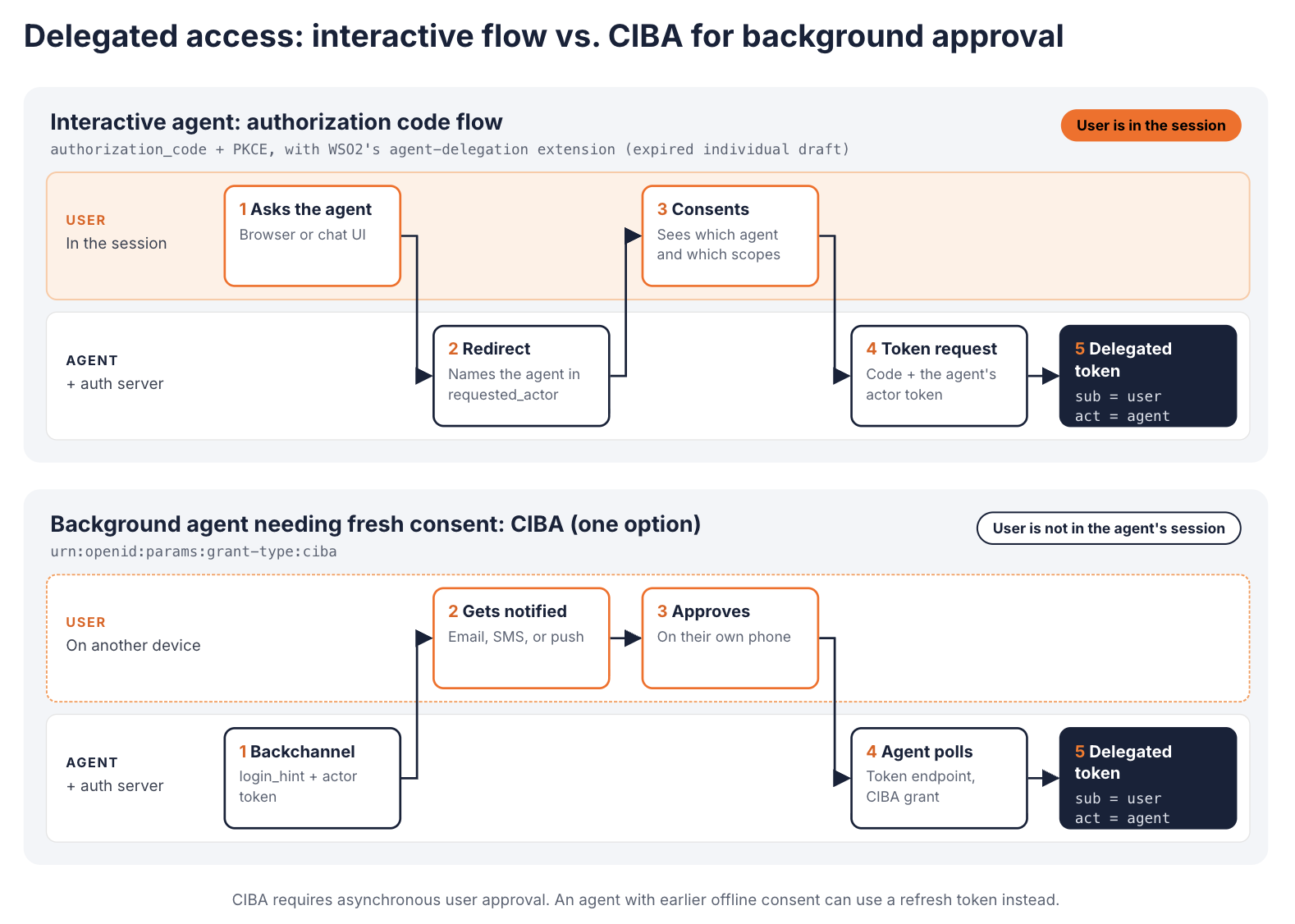
The interactive flow uses WSO2's agent-delegation extension, which is based on an expired individual Internet-Draft and requires compatible implementations. CIBA is one option for background consent, and it requires asynchronous user approval.
The same split applies whether you expose capabilities as REST endpoints or as MCP tools. For MCP connections, the OAuth 2.1 authorization code flow in the MCP specification matches the interactive row.
Building the Audit Trail: What "Governed" Actually Requires
An audit trail is only useful if each entry names the agent. Agents that share a service account all appear in logs as that account. Investigators then cannot tell which agent acted, or for whom. Per-agent identity fixes attribution at the source, and it lets you keep agent actions distinguishable from human user trails.
A usable audit record for an agent action contains:
- Actor - The agent's identifier, and its version if behaviour changes between releases.
- Subject - The user the agent acted for, if the access was delegated.
- Resource - The API operation or MCP tool called, and the target object.
- Decision - Allow or deny, and the policy or condition that produced it.
- Outcome - What happened downstream, including errors.
- Token context - Token identifier, scopes, and the delegation chain.
Log the delegation chain at every hop. Under RFC 8693, nested act claims for prior actors are informational only. Only the outermost actor counts for access control. If an orchestrator hands work to a sub-agent, the final token alone is weak evidence of how the work got there.
The same OWASP list names missing telemetry as MCP08, Lack of Audit and Telemetry, and it recommends immutable trails of tool invocations. With known identities, you can also baseline each agent's normal behaviour. A spike in denied write calls from one agent is a signal you can alert on. The walkthrough on governing write-capable MCP tools shows one way to do this at the gateway. The same records support compliance reporting, because they answer who did what, under which authority.
A Practical Framework for Scoping Agent API Permissions
The layers above become a repeatable process. Apply it per agent, not per platform.
- Map the agent to resource-scoped entitlements. List the API operations and tools the agent's job requires. Group them by resource and by risk, and separate reads from writes. Anything the agent might need only occasionally belongs in a task-scoped request, not in its standing role.
- Choose the grant by agent type. Use the table above. Decide whether the agent acts as itself or for a user, and whether that user is in the session.
- Issue short-lived, audience-bound tokens. Request only the scopes the current task needs, for the API being called. Keep lifetimes short, and move refresh logic into the client library rather than the prompt.
- Wire up audit logging before production. Record actor, subject, resource, decision, outcome, and token context for every call. Keep agent records separate from human ones.
- Set immediate revocation paths. Make it possible to disable an agent identity, and to withdraw a user's delegation, without redeploying anything. Locally validated tokens stay valid until they expire, so short lifetimes bound that gap. Where you need an instant cutoff, have the enforcement point check revocation status. Design write tools so a retry after revocation or token expiry is safe, using idempotency keys and safe-to-retry semantics.
Applied to the support agent from earlier, the process looks like this. Its standing entitlement is invoices:read, and credits:create is a separate, task-scoped request. When a customer asks for a refund inside a chat, the agent acts for that customer through the interactive grant. The resulting token names the customer as subject and the agent as actor. It expires quickly and is valid only for the billing API. The gateway logs the credit with both identities and the policy that allowed it. If the agent starts issuing credits outside chat sessions, you disable its identity. It can no longer obtain tokens, and any token it already holds expires within minutes.
When is this worth the effort? Look for operational triggers rather than usage thresholds, such as the ones below:
- More than one agent shares a credential, and you cannot attribute actions.
- Agents act for users on regulated data, such as health or payment records.
- Agents call external APIs that charge per call, and you need spend attribution per agent.
- Agents move from pilot to production scale, where a leaked key has real reach.
How WSO2 Agent ID Implements This
WSO2 Agent ID treats agents as first-class identities in the WSO2 Identity Platform. It maps onto the four functions described earlier:
| Function | How Agent ID handles it |
|---|---|
| Administer | Agents are provisioned through SCIM2 with agent extensions, with metadata such as owner, purpose, and risk level. |
| Authenticate | Agents authenticate without human intervention, with mTLS and Private Key JWT options. |
| Authorize | Context-aware policies evaluate agent metadata, user consent, and risk signals. Tokens state whether the agent acts for itself or for a user. |
| Audit | Agent actions are logged separately from human user trails, which supports anomaly detection and compliance reporting. |
Grant flows per agent type
The agent authentication documentation covers each row of the earlier grant table. An agent acting on its own authenticates with its Agent ID and secret through a redirect-free flow. An interactive agent acting for a user follows an extended authorization code flow. The client sends a requested_actor parameter, and the user sees which agent is asking and for which scopes. The agent then proves itself with an actor_token at the token endpoint. That flow adopts an IETF individual draft about on-behalf-of authorization for AI agents, co-authored by WSO2 engineers. The draft has no formal IETF standing and has expired, which reflects how unsettled this area still is. The requested_actor parameter, and the use of an actor token in this flow, come from that draft. RFC 8693 defines token exchange and the act claim, but it does not standardize this extension. The flow works only with authorization servers that implement it.
For background agents, Agent ID combines CIBA with the agent's actor token. The agent starts the request:
curl -X POST https://api.asgardeo.io/t/{organization_name}/oauth2/ciba \
  --header "Authorization: Basic <Base64Encoded(CLIENT_ID:CLIENT_SECRET)>" \
  --header "Content-Type: application/x-www-form-urlencoded" \
  --data-urlencode "scope=openid profile" \
  --data-urlencode "login_hint=<username>" \
  --data-urlencode "binding_message=Agent requesting access on your behalf" \
  --data-urlencode "actor_token=<AGENT_ACTOR_TOKEN>"
After the user approves on their device, the agent polls the token endpoint with grant_type=urn:openid:params:grant-type:ciba. The issued token names the user as sub and the agent in the act claim:
{
  "sub": "<user_identifier>",
  "act": {
    "sub": "<agent_identifier>"
  }
}
A worked example: Claude without static API keys
WSO2 has documented an integration between Agent ID and Claude's Workload Identity Federation. The setup has five steps:
- Register an application in WSO2 Identity Platform for agents to authenticate against.
- Create an identity for each agent, with its own Agent ID, credentials, groups, and roles.
- Register WSO2 as a trusted federation issuer in the Claude Console.
- Create a Claude service account for each agent, or group of agents, in the right workspace.
- Define federation rules that bind WSO2 agent identities to those service accounts.
At runtime, the agent authenticates to WSO2 and receives a signed identity token. It exchanges that token with Claude for a short-lived access token, then calls the API. No static sk-ant- key lives in the agent's environment. The federation rule is where the policy sits. Matching on the issuer alone would let any WSO2 agent map to any service account. Matching on issuer and subject keeps one agent from impersonating another.
Runtime enforcement at the AI Gateway
Agent ID decides who an agent is and what its token carries. The WSO2 AI Gateway enforces those decisions on live traffic to LLMs, MCP servers, and A2A agents. For MCP traffic, its MCP governance policies validate tokens and check per-tool scopes or JWT claims before a call reaches the server. For model traffic, a WSO2 tutorial shows the gateway checking the role in an agent's token before routing the request to a specific model. One identity source and one enforcement layer keep the same agent identity visible across both kinds of traffic.
Teams that are not ready for the full stack can start smaller. The open source Open MCP Auth Proxy sits in front of an existing MCP server and validates bearer tokens. The server code stays unchanged.
Conclusion
Agent permissions work best as their own governance layer. Human RBAC and shared service-account credentials both leave gaps. An agent needs its own identity and scopes that follow the task. Its tokens should expire quickly, and its grant type should match whether a user is present. Every action it takes should leave an audit record that names it. Most of the standards involved are mature. The delegation extensions for AI agents are still being worked out, so expect some of the details to change.
If you are ready to give agents first-class identities rather than adding permissions to existing IAM, start with WSO2 Agent ID. You can try it free and test the grant flows above against your own APIs.
Frequently Asked Questions
What are agent API permissions?
Agent API permissions are the rules that decide which API operations an AI agent may call, on which resources, and on whose behalf. They are tied to the agent's own identity, not a shared key. They are issued as scoped OAuth tokens, and every use is logged.
How is AI agent authorization different from user authorization?
User authorization usually grants access by job role, and a person decides each action. An agent decides its next action at runtime, often from untrusted input. Its access has to be scoped to the current task and bounded in time. Every call also needs to be attributable to that specific agent.
Should an AI agent use the user's OAuth token?
Not directly. Reusing a broad user token usually gives the agent more access than its task needs. Issue a token for the intended resource and task with the minimum necessary scopes. Where the authorization server supports it, that token names the user as the subject and the agent as the actor.
Which OAuth grant should an AI agent use?
It depends on who the agent acts for. An agent acting for itself uses its own credentials. An agent acting for a user in a live session uses the authorization code flow. A background agent acting for a user can use CIBA. An agent handing work to another agent can use token exchange.
What is CIBA, and when do AI agents need it?
CIBA (Client-Initiated Backchannel Authentication) is an OpenID flow where the user approves a request on a separate device, without a browser redirect. Agents need it when they act for a user who is not in the agent's session. An overnight task that still needs the user's consent is a typical example.
How long should an AI agent's access token last?
As short as the workload can tolerate, typically minutes rather than hours or days. Short lifetimes limit what a leaked token can do. The client library should refresh tokens before they expire, so the agent never handles the refresh logic itself.
How do you audit what an AI agent did?
Give each agent its own identity, then log every call with the agent's identifier, any delegating user, and the resource or tool called. Record the policy decision and the outcome as well. Keep these records separate from human activity logs, so investigators can trace each action to one agent.
How do you revoke an AI agent's access?
Disable the agent's identity in the identity provider, or withdraw the user's delegation. The agent can then no longer get new tokens. Tokens it already holds stay valid until they expire, unless the gateway or API checks revocation status on each request.

