Function Calling vs. Tool Calling vs. MCP: What's the Difference?
Your agent works well against one model until someone asks for a second provider, and then the tool layer breaks. The tool definitions look almost the same, but the request shape, the response shape, and the way you return results all differ. Then a teammate asks whether MCP makes all of this unnecessary.
It doesn't. This guide explains what function calling is, how the loop runs, and where OpenAI and Anthropic differ at the field level. It then covers where the Model Context Protocol (MCP) fits and how to design tool schemas. The last sections cover tool failures and what changes once an application needs more than one model provider. It is part of the agent-ready APIs series.
What Is Function Calling? (And Is It the Same as Tool Calling?)
Function calling and tool calling are the same concept. A model receives descriptions of functions it may use. When a request needs one, the model returns a structured call with a function name and arguments. Your application runs the function and sends the result back. The model never executes anything itself, even when its output looks like code.
The two names come from vendor convention. OpenAI's documentation states it directly: function calling is "also known as tool calling." "Tool" is the broader term in current APIs. A function is one kind of tool, defined by a JSON Schema. Providers also offer built-in tools, such as web search, that run on their side.
A practical example makes the boundary clear. Suppose a support agent gets the question "Where is order 4417?" The model cannot query your order system on its own, so it can only return something like get_order_status(order_id="4417"). Your code decides whether to run that call, runs it against your API, and returns the status. Every permission check, retry, and audit record lives in your code, not in the model.
That boundary matters for every section that follows, because function calling is a contract between your application and a model. It is not a protocol for reaching tools, and it does not give the model network access of its own.
How Function/Tool Calling Actually Works
The loop has five steps. OpenAI documents the same five, and the pattern holds for other providers.
- Send the prompt and tool definitions. Each definition has a name, a description, and a JSON Schema for its parameters.
- Receive a tool call. The model returns a structured request with a tool name and arguments, but nothing has run yet.
- Validate and execute. Your application checks the arguments, then calls the real API, database, or service.
- Send the result back. The result goes into the conversation, linked to the call by an ID.
- Receive the final answer. The model either answers in natural language or issues another tool call.
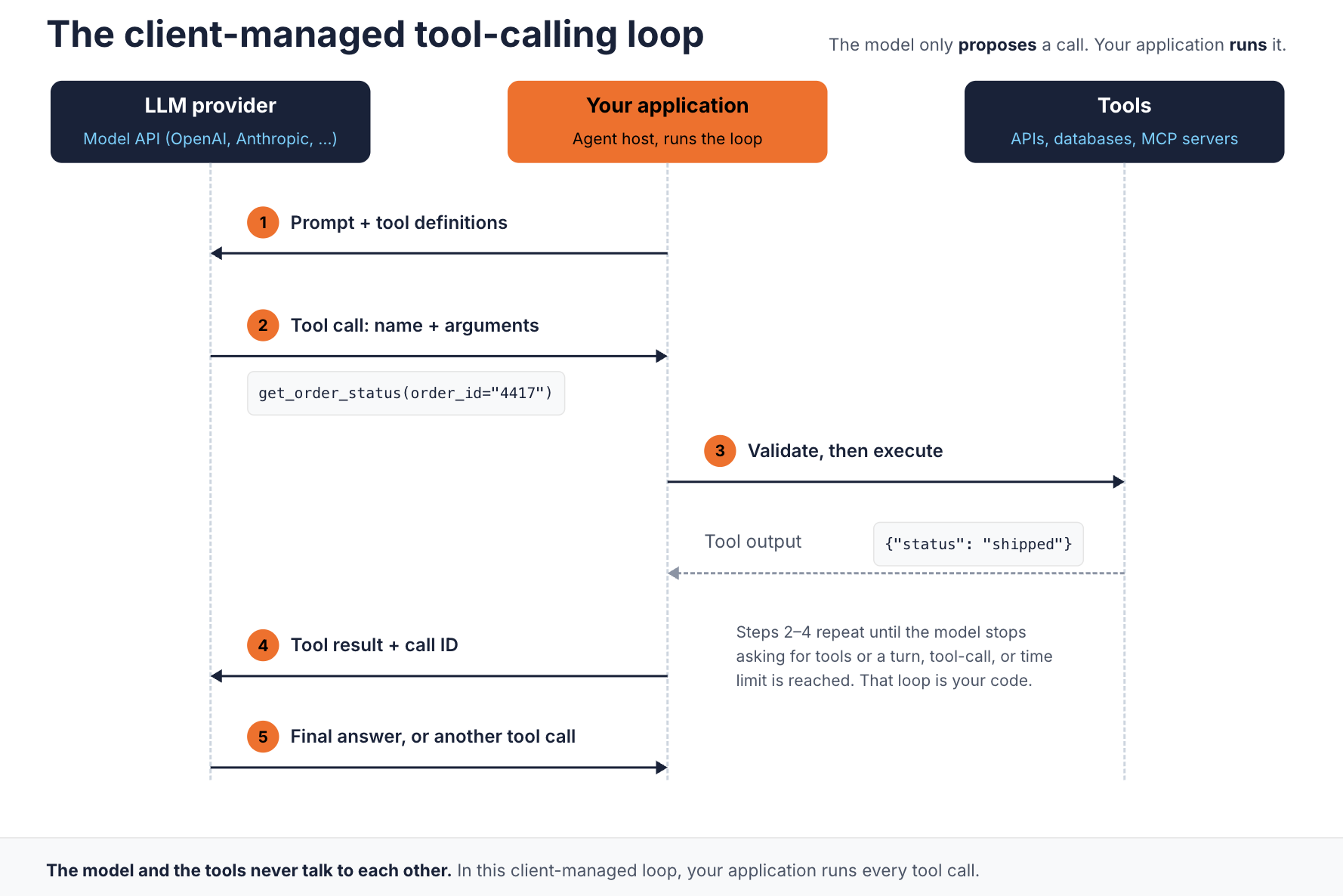
The model and the tools never talk to each other. In this client-managed loop, your application runs every tool call.
The diagram shows a client-managed tool loop, where your application runs the tools. In this arrangement, the model and the tools never talk to each other. The application calls the model API, and it initiates every tool call itself, either directly or through a proxy. A call to the model does not pass through the tool, and a tool call does not pass through the model. Provider-hosted tools work differently, as the MCP section explains.
Step 5 is what makes multi-step agentic AI possible. A multi-step task becomes a loop of steps 2 to 4 until the model stops asking for tools. That loop is your code, so you own its limits. Tool definitions also cost money on every turn. OpenAI notes that callable function definitions count against the context window and are billed as input tokens.
OpenAI Function Calling vs. Anthropic Tool Use: The Same Idea, Different Shapes
Both providers implement the same five-step loop, and the differences are in the field names and in where data sits in each message. Those differences are small, but every one of them breaks an integration that assumes the other shape. For broader trade-offs between the two APIs, see OpenAI API vs Anthropic API vs Gemini API.
This section uses the OpenAI Chat Completions API. OpenAI's newer Responses API flattens the tool definition and uses function_call and function_call_output items keyed by call_id. Chat Completions is also the shape that the gateway translation described later in this guide supports.
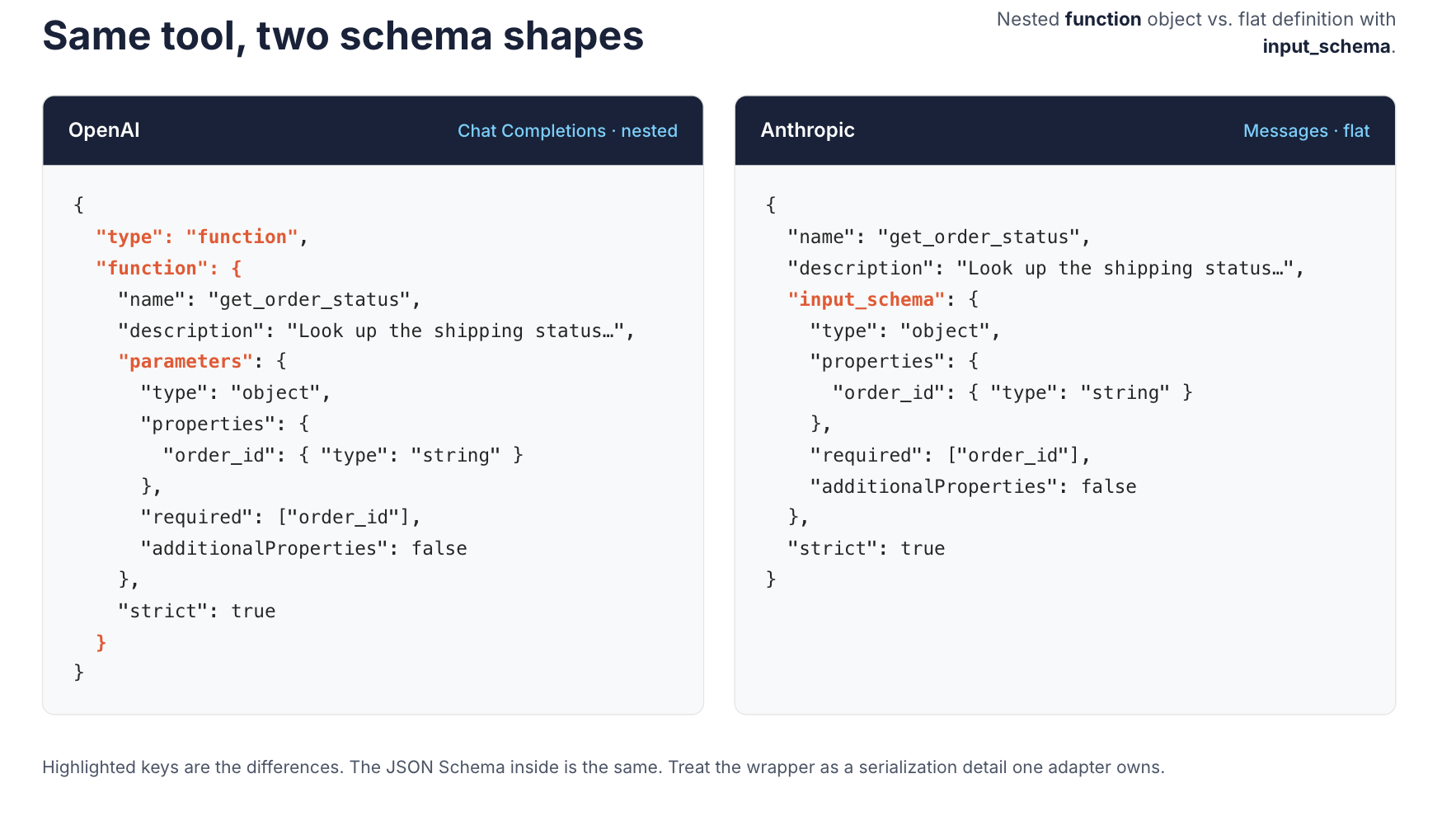
The JSON Schema inside is the same. Treat the wrapper as a serialization detail that one adapter owns.
Defining a tool
OpenAI nests the function inside a function object. With strict: true, every property must be listed in required and additionalProperties must be false.
{
  "type": "function",
  "function": {
    "name": "get_order_status",
    "description": "Look up the shipping status of one customer order by its order ID. Use only when the user gives an order ID.",
    "parameters": {
      "type": "object",
      "properties": {
        "order_id": { "type": "string", "description": "Order ID, for example 4417" }
      },
      "required": ["order_id"],
      "additionalProperties": false
    },
    "strict": true
  }
}
Anthropic puts the schema at the top level of the tool, under input_schema. There is no function wrapper. To turn on strict mode, add "strict": true at the top level, next to input_schema.
{
  "name": "get_order_status",
  "description": "Look up the shipping status of one customer order by its order ID. Use only when the user gives an order ID.",
  "input_schema": {
    "type": "object",
    "properties": {
      "order_id": { "type": "string", "description": "Order ID, for example 4417" }
    },
    "required": ["order_id"],
    "additionalProperties": false
  },
  "strict": true
}
Returning the result
The response side differs more than the definitions do. OpenAI returns tool_calls on the assistant message. Each call has an id, and function.arguments is a JSON-encoded string. You return the result as a separate message with role: "tool" and the matching tool_call_id.
{ "role": "tool", "tool_call_id": "call_abc123", "content": "{\"status\": \"shipped\"}" }
Anthropic returns stop_reason: "tool_use" and a tool_use content block. Its input is already a parsed object, not a string. Anthropic has no tool role, so you return a tool_result block inside a user message, keyed by tool_use_id.
{
  "role": "user",
  "content": [
    { "type": "tool_result", "tool_use_id": "toolu_01A09q", "content": "{\"status\": \"shipped\"}" }
  ]
}
A Quick-Reference Comparison Table
The table adds MCP as a third column, since MCP defines its own tool shape. This is the full field map used in the rest of the guide.
| Aspect | OpenAI (Chat Completions) | Anthropic (Messages) | MCP |
|---|---|---|---|
| Tool definition | tools[].function with name, description, parameters | tools[] with name, description, input_schema | tools/list result with name, description, inputSchema |
| Schema language | JSON Schema | JSON Schema | JSON Schema |
| Call signal | tool_calls on the assistant message | stop_reason: "tool_use" plus tool_use blocks | Client sends tools/call |
| Arguments | JSON string in function.arguments | Parsed object in input | Object in params.arguments |
| Result | role: "tool" message with tool_call_id | tool_result block in a user message with tool_use_id | JSON-RPC result with content |
| Error signal | No dedicated field. Describe the error in content | is_error: true on tool_result | isError: true in the result |
| Disable tools | tool_choice: "none" | tool_choice: {"type": "none"} | Not applicable. The host decides which tools to expose |
| Force a tool | "required" or a named function | any or tool, not supported on some current models | Not applicable |
| Strict schemas | strict: true | strict: true | Not applicable. Servers validate inputs |
Two rows in this table deserve a closer look. Anthropic supports tool_choice set to none, so disabling tools is possible on both sides. Forcing a tool is much less portable across providers. Anthropic's documentation states that any and tool return a 400 error on Claude Opus 5.5, Claude Sonnet 5.5, Claude Fable 5.1, and Claude Mythos 5.1. Code that forces a tool on one provider can fail on the other.
The arguments row is easy to get wrong in a hand-written adapter. OpenAI arguments arrive as a string that needs decoding. Anthropic input arrives already parsed.
Where MCP Fits: A Standardization Layer, Not a Competing Mechanism
The "OpenAI function calling vs MCP" framing suggests a choice between the two, but there isn't one. MCP does not replace function calling. It standardizes how tools are discovered and invoked, so the same tool definitions work across any MCP-compatible client.
MCP is an open standard for connecting AI applications to external systems. It uses a client-host-server model built on JSON-RPC. An MCP server publishes tools, and a client discovers them with tools/list and invokes them with tools/call. Each tool carries an inputSchema written in JSON Schema. For how to build and run an MCP server, see MCP implementations.
Here is how the two layers meet in a running agent:
- The host application asks each MCP server for its tools with
tools/list. - The host maps each tool into the model's format. An MCP
inputSchemabecomes an OpenAIparametersobject or an Anthropicinput_schema. - The model emits an ordinary tool call, exactly as in the previous section.
- The host maps that call to a
tools/callrequest on the right server and returns the result to the model.
The specification gives the host this coordinating role. The host "coordinates AI/LLM integration," and each client keeps a one-to-one connection with a single server. The two layers are complementary. MCP exposes external capabilities, while the provider API carries the model's tool requests and results. Some providers also host the MCP client on their side. OpenAI, for example, offers a built-in tool that reaches MCP servers. In that arrangement, OpenAI's platform calls the MCP server itself, and the response contains an mcp_call item with the arguments and the server's output. Your application does not execute that call as a function call. MCP replaces the custom glue between your application and each tool, not the contract between your application and the model.
This changes where the work moves. Without MCP, every tool integration is hand-wired per application and per SDK. With MCP, a tool is written once and any compliant host can discover it. The cost is a new runtime dependency. MCP servers, especially remote ones, are services that need authentication, authorization, and rate limits. They also need monitoring like any other API.
MCP is not always worth that cost. A single application that calls a few private functions gains little from a protocol layer. The case for MCP grows when the same tools serve several applications, or when agents built by other teams need to discover them without custom integration work.
Schema Design Best Practices
A tool schema works as part of the prompt. The model selects a tool and fills its arguments using only the name, the description, and the schema. Poor schemas cause wrong tool selection long before they cause runtime errors.
Write descriptions for the model, not for people
Anthropic calls detailed descriptions "by far the most important factor in tool performance." State what the tool does, when to use it, when not to use it, and what each parameter means. A description like "Gets order" is too vague for reliable selection. "Look up the shipping status of one order by ID. Use only when the user gives an order ID" is better.
Keep the tool set lean per request
Every definition adds input tokens on every turn. A long list also makes the model's selection harder and less predictable. Anthropic recommends consolidating related operations into fewer tools, since fewer tools reduce selection ambiguity. If an agent needs a large tool surface, load tools on demand instead of sending everything at once.
Constrain inputs in the schema
Use enums for fixed values and required fields for anything the tool cannot run without. Turn on strict mode where the provider supports it. OpenAI's strict mode makes calls adhere to the schema instead of best effort. Anthropic's strict: true guarantees tool inputs match the schema.
Do not ask the model for values you already have
If your code knows the customer ID from the session, inject it at execution time and leave it out of the schema. This reduces the arguments the model can get wrong, and it also stops the model from choosing a different customer.
Name tools for a shared namespace
Prefix names with the service, such as orders_get_status or billing_issue_refund. Anthropic recommends this pattern as the tool library grows. It matters even more when tools from several MCP servers share one context.
Design for portability
Stick to JSON Schema features both providers accept, and keep the schema identical across providers. Treat the wrapper (function versus input_schema) as a serialization detail that one adapter owns. Provider strict modes accept only a subset of JSON Schema and add constraints of their own. OpenAI's strict mode, for example, requires additionalProperties set to false on every object. A schema that an MCP server publishes is therefore not automatically valid for every provider. Have the adapter validate and normalize each schema before it sends the request. The examples in this guide use the same constraints for both providers.
Error Handling for Tool Calls
Tool calls fail in four places, namely the arguments, the execution, the results, and the loop. Each needs its own handling.
Malformed or invented arguments
OpenAI's API reference warns that the model "does not always generate valid JSON, and may hallucinate parameters not defined by your function schema." Parse and validate before execution, even with strict mode on. Strict mode covers schema shape. It does not check business rules, such as whether the order belongs to this user.
Execution failures
Return the failure to the model instead of silently dropping it. Anthropic provides is_error: true on tool_result. MCP reports tool execution errors with isError: true, and clients should pass them to the model so it can self-correct. Make the message actionable. Anthropic advises stating what went wrong and what to try next. "Order 4417 not found. Ask the user to confirm the ID" gives the model a path forward. A bare "Error" string does not.
Untrusted results
Tool output often contains text from outside your control, such as web pages, emails, or third-party API fields. Anthropic warns that such content can carry indirect prompt injection. The MCP specification also says clients should validate tool results before passing them to the model, set timeouts, and log tool usage.
Runaway loops
A model can call the same tool repeatedly when results confuse it. A single response can also contain several tool calls. Cap the model turns, the total number of tool calls, and the wall-clock time for each request. The loop belongs to your code, so the limits belong there too.
import json
import logging
import time

from jsonschema import ValidationError, validate

log = logging.getLogger("agent")


def run_agent(client, model, messages, tools, handlers, schemas,
              max_steps, max_tool_calls, deadline_seconds):
    deadline = time.monotonic() + deadline_seconds
    calls_used = 0
    for _ in range(max_steps):
        if time.monotonic() > deadline:
            break
        reply = client.chat.completions.create(model=model,
                                               messages=messages, tools=tools)
        message = reply.choices[0].message
        if not message.tool_calls:
            return message.content
        messages.append(message)
        for call in message.tool_calls:
            name = call.function.name
            calls_used += 1
            if calls_used > max_tool_calls or time.monotonic() > deadline:
                result = {"error": "Tool budget used up. Answer with what you have."}
            elif name not in handlers:
                result = {"error": f"Unknown tool {name}."}
            else:
                try:
                    args = json.loads(call.function.arguments)
                    validate(args, schemas[name])
                    result = handlers[name](**args)
                except json.JSONDecodeError:
                    result = {"error": f"Arguments for {name} were not valid JSON."}
                except ValidationError as exc:
                    result = {"error": f"Invalid arguments for {name}: {exc.message}"}
                except Exception:
                    log.exception("Tool %s failed", name)
                    result = {"error": f"{name} failed. Tell the user it could not complete."}
            messages.append({"role": "tool", "tool_call_id": call.id,
                             "content": json.dumps(result)})
    raise RuntimeError("Stopped at the turn, tool-call, or time budget without a final answer")
This minimal loop validates argument shape and limits model turns, tool calls, and total time. It does not provide duplicate-write protection, authorization, or per-handler timeouts. Add those controls before exposing operations with side effects. For writes, use a stable operation ID with server-side idempotency, check that the caller may act on the specific object, and define a recovery policy. Do not block every repeated argument set, because two separately authorized refunds can have identical arguments. The example uses the Chat Completions shape. Set max_steps, max_tool_calls, and deadline_seconds from what the task needs and log every stop. A trace of each call, argument set, and result is what lets you debug an agent after the fact. Redact sensitive arguments and results before they reach the logs, and restrict who can read the traces.
Choosing an Approach for Multi-Provider Applications
For a single-vendor application, use that vendor's native function calling directly. The SDKs handle the shapes, and a translation layer would add work without adding value. Add MCP when tools need to be shared across applications or exposed to agents you do not control.
The decision changes when operational needs appear, and the triggers are qualitative rather than a traffic number:
- More than one model provider. Each new provider adds another adapter for the shapes in the comparison table.
- Spend attribution. Finance needs cost per team or per application, which is hard to assemble from separate SDK integrations.
- Regulated data in prompts and tool results. Masking and audit must apply the same way for every model and tool.
- Production scale and shared tools. Several teams reuse the same tools, and each tool needs one access policy instead of one per application.
At that point, translation and policy belong in shared infrastructure. The WSO2 AI Gateway handles both kinds of AI traffic: model calls through LLM proxies and tool calls through MCP proxies. These are separate paths, and an MCP proxy routes to its MCP server directly, without passing through an LLM provider. The application still runs the tool calling loop itself.
Model traffic
With multi-provider routing, an application sends every request to one OpenAI-compatible endpoint and selects a provider, for example with an x-provider header. The OpenAI to Anthropic transformer maps OpenAI tools, tool_choice, tool_calls, and tool messages to Anthropic tools with input_schema, tool_use, and tool_result. It maps required to any, a named function to tool, and drops the tools array when tool_choice is none. The OpenAI to Gemini transformer does the same for Gemini's functionDeclarations and toolConfig.
This is the comparison table, implemented once instead of in every application. On the same model path, the Semantic Tool Filtering policy trims the tools array in each request to the tools relevant to the user query. That applies the lean-tool-set rule from the schema section without changing application code. Smarter AI traffic with Jev shows tool filtering at work.
The translation has limits. It targets the Chat Completions API only. It does not carry over strict-mode flags or parallel_tool_calls. A successful conversion also does not mean the target model accepts the mapped value. A forced tool choice still fails on Claude models that reject forced tool use. Keep argument validation in your application regardless of what the gateway translates.
Tool traffic
For MCP proxies, MCP governance policies cover authentication, per-tool authorization, allow and deny lists, tool renaming, and rate limits per tool or method.
One control plane for both
AI Workspace is the control plane that covers both paths. It manages LLM providers, App LLM proxies, MCP proxies, and their credentials across connected gateways. In release 2026.09.24, a gateway keeps serving traffic if AI Workspace becomes unreachable, and the sync catches up once the connection is restored. Changes made in AI Workspace during the outage, such as new policies or revoked credentials, do not reach the gateway until then.
Conclusion
Function calling and tool calling are one mechanism under two names. The model proposes a structured call, and your application decides whether to run it. OpenAI and Anthropic implement the same loop with different field shapes, and the response side needs the most adapter code. MCP sits beside function calling. It standardizes tool discovery and invocation, while the model still emits ordinary tool calls.
Start with native function calling, good schemas, and strict validation. Add MCP when tools need to be shared across applications or agents. Move translation and policy into a gateway when you add a second provider. The same applies when cost, compliance, and access control must work the same way across every model and tool. To try the model side, follow the multi-provider routing guide to put OpenAI and Anthropic behind one endpoint.
Frequently Asked Questions
What is function calling in LLMs?
It is a model's ability to return a structured request for an external function, with a name and JSON arguments. The application runs the function and returns the result.
What is the difference between function calling and tool calling?
There is no functional difference. They are two names for the same mechanism. "Tool" is the broader term, and a function is one type of tool.
What is an example of a function call?
A model asked "Where is order 4417?" returns get_order_status with {"order_id": "4417"}. Your code queries the order system and sends back the status.
Does MCP replace function calling?
No. MCP standardizes how tools are discovered and invoked across clients. The model still uses its provider's function calling format to request a tool.
Does the model execute the tool?
No, the model only proposes the call. Your application, or a host acting for it, validates the arguments and executes the tool.
Can one application use both OpenAI and Anthropic tool calling?
Yes, but the request and response shapes differ. You either maintain an adapter for each provider or route through a gateway that translates between them.

