API Versioning Best Practices: Strategies for Long-Lived APIs
An API that never changes eventually stops being useful, and an API that changes carelessly eventually stops being trusted. Versioning is how a team keeps shipping improvements without breaking the clients that already depend on it.
This guide covers the four common versioning strategies, a framework for choosing between them, and the practices that keep a versioning scheme workable for years rather than months.
What Is API Versioning?
API versioning is the practice of managing changes to an API's contract so that existing clients keep working while new functionality ships. In practice, it means giving each meaningfully different version of a resource, endpoint, or response shape its own identifier, whether that's a number in the URL, a value in a request header, or a media type in an Accept header, so that client and server can agree on which contract they're using.
The identifier matters less than what it protects. Once a client integrates with your API, it has effectively signed a contract with the shape of your requests and responses. That's why getting the underlying REST API design fundamentals right from the start makes versioning easier later on. Versioning is the mechanism that lets you change that shape on your own schedule, not your slowest client's.
Why API Versioning Matters and What Happens Without It
Imagine a payments API that renames a field from total to amount_total in place, with no version boundary. Every client parsing the old field name starts failing silently. Orders stop reconciling, dashboards show zeros, and nobody notices until finance asks why yesterday's numbers don't add up. That's what a breaking change looks like when there's no version boundary to contain it: the API contract broke without warning, and every consumer paid for it at the same moment.
This is also where the commercial stakes appear. Teams looking for versioning guidance are usually past the theoretical stage. Either they've just broken a client integration, or they're building a public or partner-facing API and don't want to learn about breaking changes from a support ticket. A clear versioning strategy turns "we changed something and hoped nobody noticed" into "we changed something, told consumers in advance, and gave them time to move."
Without a version boundary, every change to an API is a bet placed on every consumer at once. With one, a breaking change becomes an opt-in upgrade instead of a surprise outage. That's the real reason this topic keeps coming up in API design discussions. It's less about the mechanics of putting /v2/ in a URL and more about maintaining a contract that other people's software relies on.
The 4 Main API Versioning Strategies
Most REST APIs express their version through one of four mechanisms. They all solve the same problem, telling the server which contract a request expects, but they differ in where that information lives and how visible it is.
1. URI Path Versioning
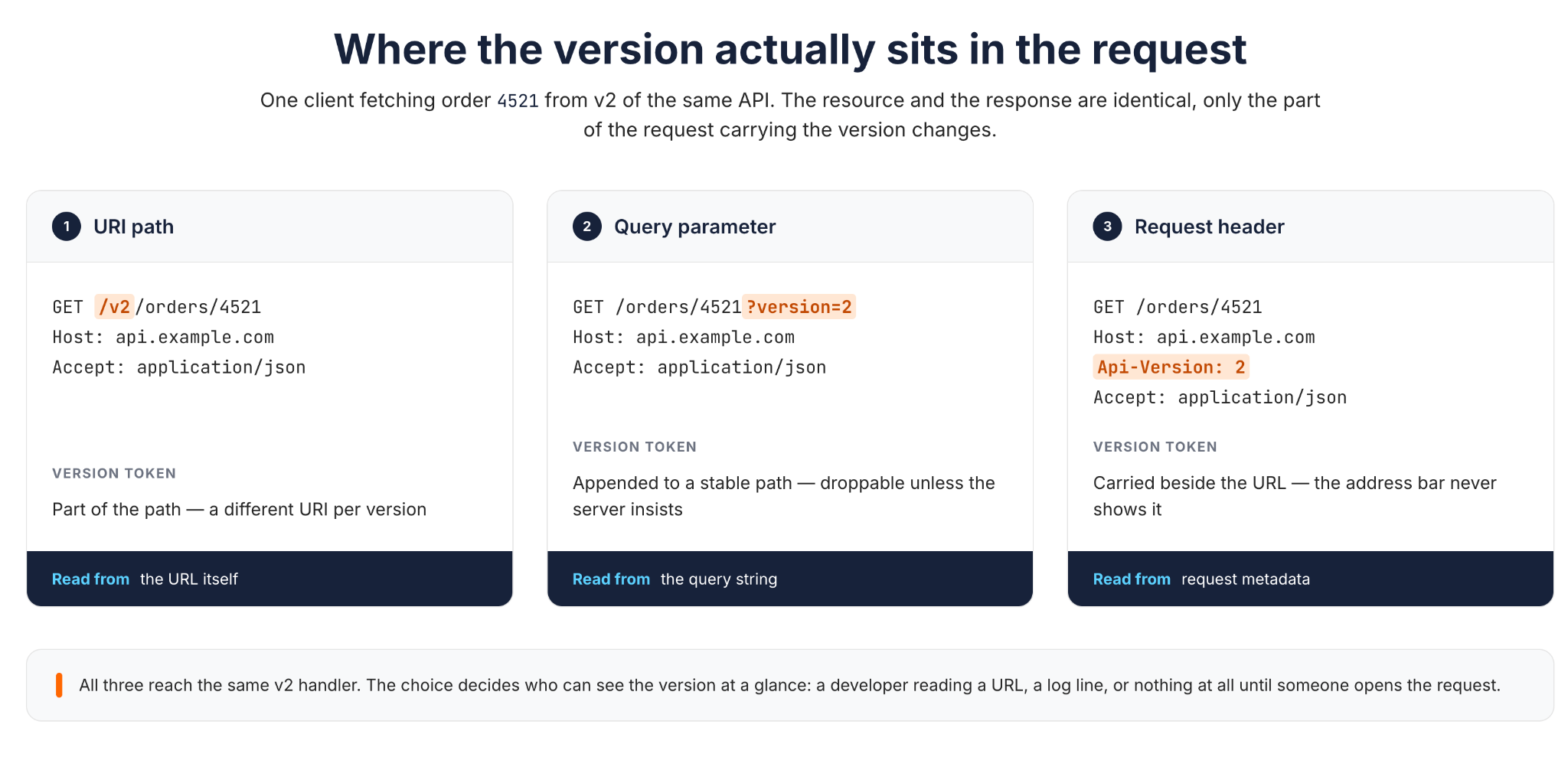
The version appears directly in the URL path, before the resource: GET /v2/orders/4521. This is the most common approach in practice, because it's immediately visible, trivially cacheable by URL, and easy to route at the gateway or load balancer without inspecting headers.
The cost is that every version becomes a distinct URI. /v1/orders/4521 and /v2/orders/4521 are, strictly speaking, different URIs for what a consumer thinks of as the same order. That's a practical trade-off rather than a rule REST imposes, since a resource can have more than one URI or representation. It also means routing tables and internal documentation grow with every version you keep alive.
2. Query Parameter Versioning
The version travels as a query string parameter on an otherwise stable path: GET /orders/4521?version=2. This keeps the resource path stable across versions. The query string is still part of the URI, though (RFC 3986), so ?version=1 and ?version=2 are still two different URIs, not one canonical one. Teams choose this approach for the stable path and simpler documentation it offers, not because it produces a single literal URI.
The trade-off is that nothing in URI syntax prevents a client from leaving the parameter out, even when the API treats it as required, so the requirement has to be enforced on the server rather than assumed. Caching needs similar care. A cache's default key is the full request URI, including the query string (RFC 9111), so ?version=1 and ?version=2 are separate cache entries by default. The real risk runs the other way: a CDN or reverse proxy deliberately configured to strip or normalize query strings for efficiency can then serve one version's response to a request for another.
3. Header Versioning
The version travels in a custom request header, completely separate from the URL: GET /orders/4521 with Api-Version: 2 set on the request. URIs stay entirely stable across versions, which keeps documentation and bookmarks simple.
The trade-off is visibility. A version carried only in a header doesn't show up in a browser's address bar, in most access logs by default, or in a quick curl command unless you remember to set it. Working out which version served a given request takes an extra step compared with a version sitting in plain sight in the URL.
4. Media-Type (Content Negotiation) Versioning
The version is embedded in the media type of the Accept header, for example Accept: application/vnd.example.v2+json. This uses HTTP content negotiation the way Fielding's dissertation originally described it, choosing among several representations of one resource, so the version lives in the representation format rather than in the resource's identifier. Some practitioners see this as the closest fit to REST's split between resources and representations for that reason. REST's constraints don't formally rank one versioning mechanism above another, though; it's a design trade-off, not a requirement.
It's also the least common approach in practice. It requires every client and every piece of tooling in the request path (proxies, API gateways, test scripts, documentation generators) to understand and correctly forward custom media types, which raises the bar for adoption compared with a header or a path segment.
Comparing the Four Strategies
| Strategy | Where the version lives | Visibility | Caching behavior | Best fit |
|---|---|---|---|---|
| URI path | In the URL, e.g. /v2/resource | High; visible everywhere | Simple; cache keys include it naturally | Public APIs, simpler gateway routing |
| Query parameter | Query string, e.g. ?version=2 | Medium; visible in the URL but easy to omit | Depends on cache configuration | Internal APIs with light versioning needs |
| Header | Custom request header | Low; invisible in the URL and browser | Requires explicit cache-key configuration | APIs that prioritize stable, clean URIs |
| Media type | Accept header content type | Low; requires client tooling support | Requires explicit cache-key configuration | Teams with strict REST/HATEOAS discipline |
How to Choose the Right Versioning Strategy
The four strategies aren't ranked by quality. They suit different contexts, and choosing the wrong one shows up months later as either a documentation headache or a debugging headache. Four questions narrow the field faster than a feature comparison.
1. Who consumes the API? A public API with thousands of unknown external consumers benefits from a version that's impossible to miss, which points to URI path versioning, because you can't contact every consumer to explain a subtler signal. An internal API used by a handful of services your own team controls can tolerate a quieter mechanism, because you can coordinate upgrades directly with the few consumers involved.
2. How often does the API change? An API with infrequent, carefully planned major releases can afford the overhead of maintaining parallel URI paths for each version. An API that changes weekly benefits from a lighter mechanism, such as a header or query parameter, where adding a version doesn't mean duplicating an entire route tree.
3. What are the caching requirements? If the API sits behind a CDN or shared cache and different versions must never collide, URI path versioning makes the version part of the cache key automatically, with nothing extra to configure. Header and media-type versioning both require deliberately configuring the cache to vary on that header, which is easy to forget and hard to spot until stale data appears. This is also where governing versioning policy across teams pays off, because a documented default catches the "we forgot to configure the cache" case before it ships.
4. How much tooling maturity can you assume of consumers? Public developer portals, Postman collections, and quick curl-based exploration all favor a version that's visible in the URL. Media-type versioning assumes consumers are comfortable setting custom Accept headers. That's a reasonable assumption for a sophisticated internal platform team and a poor one for a broad external developer audience.
None of these questions has a universally correct answer. A fintech API with regulatory audit requirements might choose URI versioning precisely because every version is traceable in access logs without extra configuration. A platform team running dozens of internal microservices might choose headers precisely to stop hundreds of route definitions from doubling with every release. The organizational context, not the technical elegance of the strategy, decides the fit.
API Versioning Best Practices
Once you've chosen a strategy, four practices determine whether it holds up over years of changes rather than falling apart at the first major release.
Maintain Backward Compatibility
The cheapest version to support is the one you never had to create. Before reaching for a new major version, check whether the change can be made additively: new optional fields, new endpoints, and new optional query parameters. Additive changes don't need a new major version. Under semantic versioning they call for a MINOR bump instead, so a release might move from 1.2.0 to 1.3.0 while the public major version, the /v1/ a client actually sees, stays exactly where it was. Existing clients that ignore the new field keep working as before, provided they don't enforce closed enums or strict schema validation that rejects fields or values they don't recognize.
Save major version bumps for genuinely incompatible changes: removing a field, renaming a field, changing a field's type, or changing required parameters. Treating a backward-compatible addition like a breaking change teaches consumers to fear every release, which defeats the purpose of having a versioning scheme at all.
Use Semantic Versioning
Semantic Versioning gives version numbers a predictable meaning. MAJOR increments for incompatible changes, MINOR for backward-compatible additions, and PATCH for backward-compatible fixes. Applying that discipline to the API itself, not just to a client SDK, means a consumer can look at a version number and know, before reading a changelog, whether an upgrade is safe to take automatically or needs a compatibility review.
Most REST APIs expose only the MAJOR component in the URI or header (/v2/, Api-Version: 2) and track MINOR and PATCH internally in the changelog, since additive and fix-level changes shouldn't force clients to opt into a new version. What matters is that the numbering scheme is consistent and documented, not that every part of the SemVer number is visible externally.
Communicate Changes and Publish Changelogs
A version number tells consumers that something changed. A changelog tells them what changed and why. Every version bump, including minor and patch releases, deserves an entry describing the change, whether it's additive or breaking, and what the consumer needs to do.
Publish the changelog somewhere durable and linkable, not buried in release notes that scroll out of view, and keep it alongside the rest of your published API documentation rather than on a separate, easily missed page. For major versions in particular, pair it with proactive notification: email, a status page entry, or an in-console banner for authenticated developers. Consumers who learn about a breaking change from a changelog they had to go looking for are already behind.
Set a Clear Deprecation Timeline
A deprecation notice with no plan behind it is easy to ignore. Deprecation and a promised shutdown date are two different things: a team can mark a version deprecated and discourage new integrations against it without yet committing to a removal date. When a sunset date is known, publish the actual date rather than a vague "in a future release," and give consumers enough lead time to plan the upgrade. Communicate whatever you know, the deprecated status and, once it exists, the sunset date, through more than one channel: documentation, the changelog, and machine-readable response headers.
Leaving a deprecation notice untouched for years also erodes trust, even without a fixed sunset date. Consumers start to treat "deprecated" as just a label rather than a real signal to move. If a team announces three deprecations that never lead anywhere, the fourth gets ignored, and the team is back to breaking consumers without warning.
Deprecating and Sunsetting Old API Versions
Deprecating a version and sunsetting it are two different events, and keeping them as two separate signals is what makes the distinction useful. Deprecation means a version is no longer recommended, but it may keep working indefinitely with no removal date attached. Sunsetting means a removal date has actually been set, after which the version stops responding.
RFC 9745 defines a standard Deprecation response header for the first case. It's a structured signal, carrying the date deprecation took effect, that a resource will be or has been deprecated, without committing to when it will stop working. RFC 8594 defines a standard Sunset header for the second case, signaling that a URI is likely to become unresponsive at a specified point in the future. Used together, Deprecation says a version is on its way out, and Sunset says exactly when. A team can send the first long before it has the second to send.
A practical sunset sequence looks like this:
- Announce the deprecation with a specific sunset date and a migration guide.
- Add the
Sunsetheader to every response from the deprecated version, so automated tooling can detect it. - Step up outbound communication as the date approaches.
- On the sunset date, return a clear error (commonly
410 Gone) rather than silently changing behavior, so a client that missed every earlier warning still gets an unambiguous signal about what happened.
Don't sunset a version the moment its usage drops to zero on your dashboard. Long-tail consumers, batch jobs, and rarely run integrations often show "no traffic this week" right up until they run once at quarter-end and fail. A published timeline protects both sides: consumers know exactly how long they have, and the API team has a defensible date to point to instead of negotiating with each straggler individually.
Real-World Examples
Two production APIs show how the strategy, and the discipline around it, matter more than which of the four mechanisms is chosen.
Stripe uses date-based versioning carried in a request header. Each account is pinned to the API version that was current when it made its first request, and that version keeps governing request and response behavior until the account explicitly upgrades. Major releases carry breaking changes, while the releases between them stay backward-compatible, so an integration built years ago keeps working without constant maintenance. Behind that stability, Stripe's engineering team has described translating current responses back into the shape an older pinned version expects, and has been open about the fact that this compatibility layer isn't free to maintain. Every additional version is more code the team has to understand and carry forward.
GitHub uses a request header carrying a date-named version. Instead of a sequential /v1/, /v2/ scheme, GitHub names each REST API version after its release date, and clients select it with the X-GitHub-Api-Version header. GitHub commits to supporting the previous version for at least 24 months after a new one ships, which gives integrators a predictable, unhurried migration window instead of a scramble. As that window closes, GitHub sends separate Deprecation and Sunset headers: Deprecation carries the date the version will close down, and Sunset carries the date it starts returning 410 Gone. It's the same two-signal idea that RFC 9745 and RFC 8594 describe, applied to a fixed support window.
Both examples rely on the discipline this guide has covered: a stable, well-documented way to signal the version, paired with a published support window that's actually honored. Neither company's approach works because of the particular mechanism it chose. It works because the mechanism is applied consistently and the support commitments are kept.
How WSO2 API Platform Simplifies Versioning
Everything in this guide (choosing a strategy, applying semantic versioning, publishing changelogs, and honoring a deprecation timeline) is process and communication work that a team has to do consistently, release after release. WSO2 API Platform doesn't replace that judgment, but it removes a meaningful share of the manual coordination behind it.
Versioning is part of the platform's core lifecycle rather than an afterthought. Teams design APIs using OpenAPI or AsyncAPI, apply governance policies, and publish with versioning already built into that flow. Each API moves through documented lifecycle states: Created, Pre-Released, Published, Deprecated, and Retired. A deprecated version stays available to existing subscribers while new subscriptions are disabled, which maps directly onto the deprecation and sunset stages described above.
Governance works through Spectral rulesets, grouped into policies that apply across the organization's API proxies and are evaluated whenever a proxy is updated. Violations are graded by severity (error, warn, or info) and shown on a compliance dashboard with notifications. A rule that checks versioning conventions, for example, flags a non-compliant change as soon as it's made rather than after a support ticket brings it to light. Rulesets can be complemented by AI compliance analysis against governance standards uploaded as PDF documents. None of this catches every breaking change automatically; it catches the ones a rule has been written for. The platform's governance framework explicitly lists versioning consistency among the standards it helps enforce across an organization's API portfolio, alongside API design and documentation.
That consistency matters most for organizations running more than one API gateway. Through the platform's federated gateway model, the control plane can discover APIs running on AWS, Azure, Kong, and Envoy gateways, catalog them in one developer portal, and monitor them against the same governance rules as WSO2-managed APIs. For supported gateways, it can also publish and deploy API configurations directly. A versioning convention defined once is therefore checked everywhere instead of being tracked by hand for each gateway, even though how a deprecation is enforced at runtime still depends on each gateway. For a platform team that inherited gateways from separate acquisitions or business units, that's the difference between one deprecation policy and five slightly different ones that each need separate tracking.
None of this removes the need to decide deliberately which of the four strategies fits a given API, or to communicate changes clearly to consumers. What it changes is how much of that work has to be redone by hand for every API and every gateway an organization runs.
Conclusion
The four versioning strategies covered here, URI path, query parameter, header, and media type, solve the same problem in different ways, and no single one is right for every API. What separates a versioning scheme that lasts for years from one that collapses at the first major release isn't the mechanism. It's whether the team chooses one deliberately, based on its real audience and pace of change, and then backs it with semantic versioning, real changelogs, and deprecation timelines it actually honors.
Choose a strategy that fits your API's audience and change frequency, commit to it, and pair it with a deprecation policy consumers can plan around. If part of what's slowing you down today is reimplementing the same governance and versioning policy across every gateway your organization runs, WSO2 API Platform's governance framework is built to apply that policy consistently from one control plane, so the discipline in this guide becomes easier to enforce, not just easier to describe.
Frequently Asked Questions
How do you decide when to create a new API version?
Create a new major version only for changes that break existing clients, such as removing or renaming a field, changing a field's type, or making an optional parameter required, because those are the changes a client can't safely ignore. Additive, backward-compatible changes, like new optional fields or new endpoints, can usually ship without a version bump.
What are the best practices for managing deprecated API versions?
Mark a version as deprecated as soon as the decision is made, using the Deprecation header, even before a removal date is set. Add a specific sunset date and the Sunset header once retirement is actually planned, and communicate through more than one channel as that date approaches. When the sunset date arrives, return a clear error instead of silently changing behavior.

