API Pagination: Design Patterns & Best Practices
Return too many records in one API response and you get a slow, memory-hungry call that strains both the server and the client. Return too few and the client needs dozens of round trips just to fill a single screen. Pagination solves this, but "just paginate it" hides a real design decision: the pattern you choose determines whether your API stays fast and correct as the data underneath it changes.
This guide covers the four pagination patterns you'll actually encounter, where each one holds up and where it breaks, and a framework for choosing between them.
What Is API Pagination?
API pagination is the practice of splitting a large collection of results into smaller, sequential chunks, or "pages," that a client requests one at a time instead of receiving the whole dataset in a single response. A typical paginated response contains one page of records plus metadata, such as a cursor or a page number, that tells the client how to fetch the next page.
In practice, that might be a GET /orders endpoint that returns 25 orders per call along with a next_cursor value, or a reporting API that caps every collection response at 100 rows and expects the client to keep looping until has_more comes back false.
Why Pagination Matters
Without pagination, a collection endpoint has to return everything it holds, however large that is. That's fine while a table has a few hundred rows. It stops being fine once it has a few million.
The classic failure is an endpoint that answers GET /records by loading every row into memory and serializing the lot into one JSON response. As the dataset grows, that call gets slower every month until it starts timing out, running the server out of memory, or sending a payload of several hundred megabytes to a client that only wanted the first screen of results.
Pagination puts an upper bound on the size of every response, so no single request can return unbounded data, however big the table becomes. It doesn't automatically bound the query behind the response, though. A deep offset, an expensive filter, or a request for a total count can still make an individual paginated request slow even when its response is small. Both the pattern you pick and the query it runs matter, as the sections below explain.
Pagination also shapes the client experience directly. A mobile app rendering a list, a batch job syncing records into a warehouse, and a dashboard paging through search results all need the same thing: a bounded, predictable chunk of data per call, and a clear way to ask for the next one.
The Four Main API Pagination Patterns
Most REST APIs use one of four pagination patterns, plus an occasional fifth for time-ordered data. What separates them is how a "page" is identified: by numeric position, by an opaque pointer, or by a value taken directly from the data.
1. Offset (Limit/Offset) Pagination
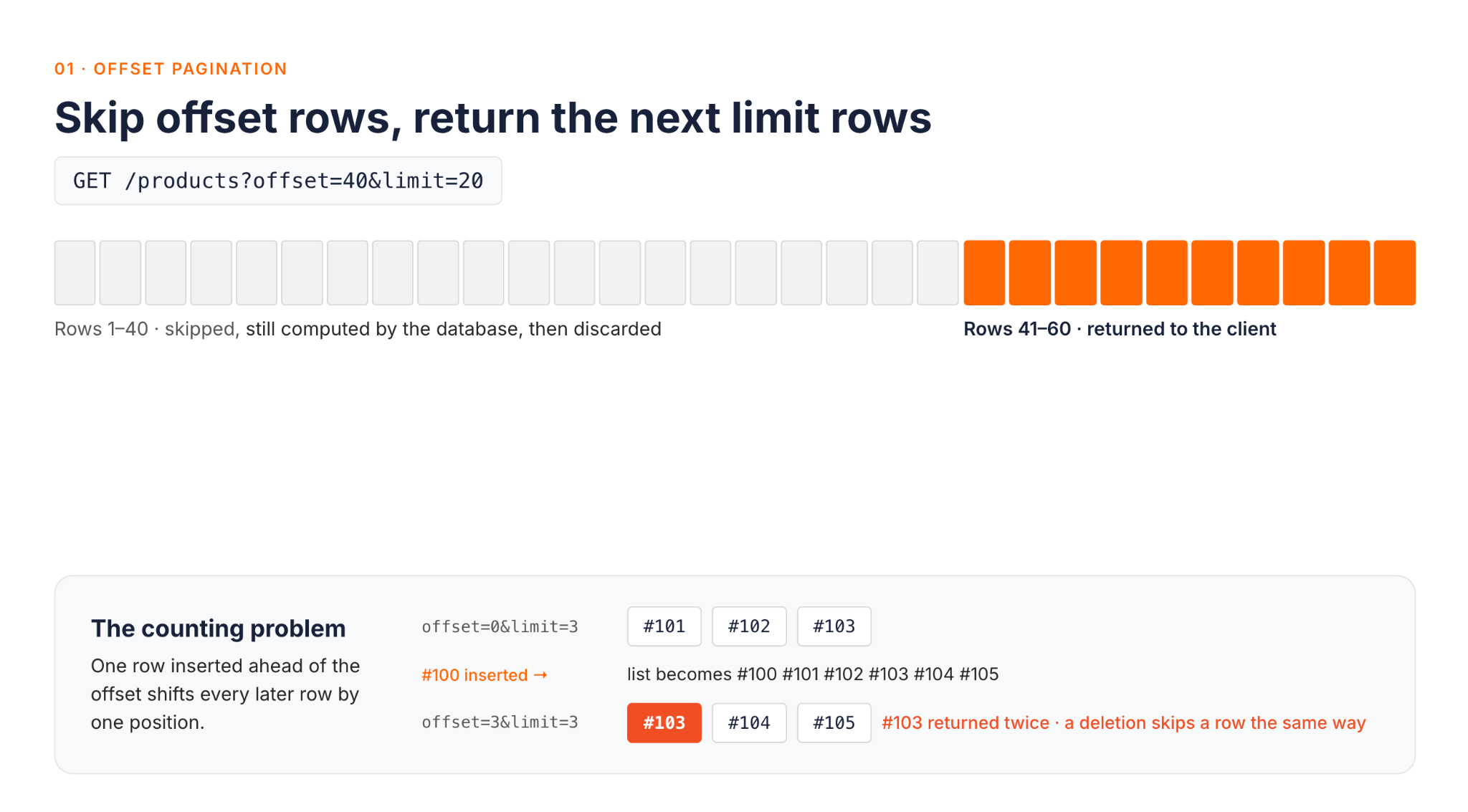
Offset pagination identifies a page by counting: skip offset rows, then return the next limit rows. A request looks like GET /products?offset=40&limit=20. It's the pattern most developers reach for first, because it maps directly onto SQL's LIMIT/OFFSET and lets a client jump straight to any page, including the last one, without walking through the pages in between.
The problem appears as soon as the data changes while a client is paging through it. If a new row is inserted ahead of the current offset, every later row shifts down one position, and the next request, still using the old offset, returns a row the client has already seen. Deletions cause the opposite problem: if a row ahead of the offset is deleted, everything shifts up one position, and the row the client expected next is skipped and never appears on any page. On a frequently changing dataset, this produces the familiar complaints of "why does the same record appear on two pages?" (an insertion) and "why did a record vanish between page 2 and page 3?" (a deletion).
Performance is a second concern. PostgreSQL's documentation notes that rows skipped by an OFFSET clause still have to be computed inside the server, so a large offset can be inefficient even though none of those rows are returned.
2. Page-Based Pagination
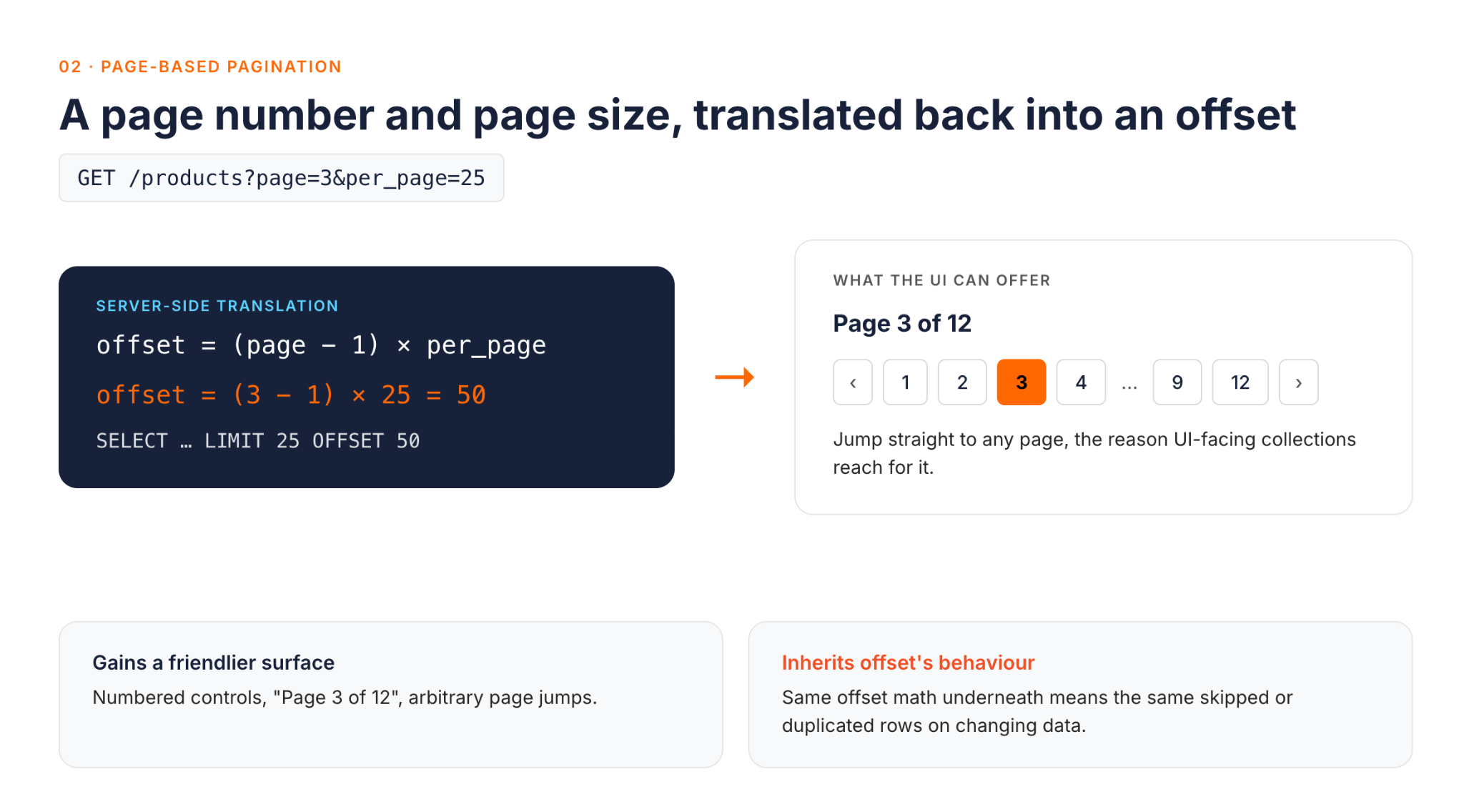
Page-based pagination is the user-facing sibling of offset pagination. Instead of offset and limit, the client sends a page number and a page size, such as GET /products?page=2&per_page=25. Most implementations translate this straight into an offset, offset = (page - 1) * per_page, so it inherits the same skipped-or-duplicated-row behavior on changing data.
What it adds is a friendlier interface for UI use cases like numbered pagination controls, where showing "Page 3 of 12" and letting a user click straight to page 9 matters more than protecting against concurrent writes.
3. Cursor-Based Pagination
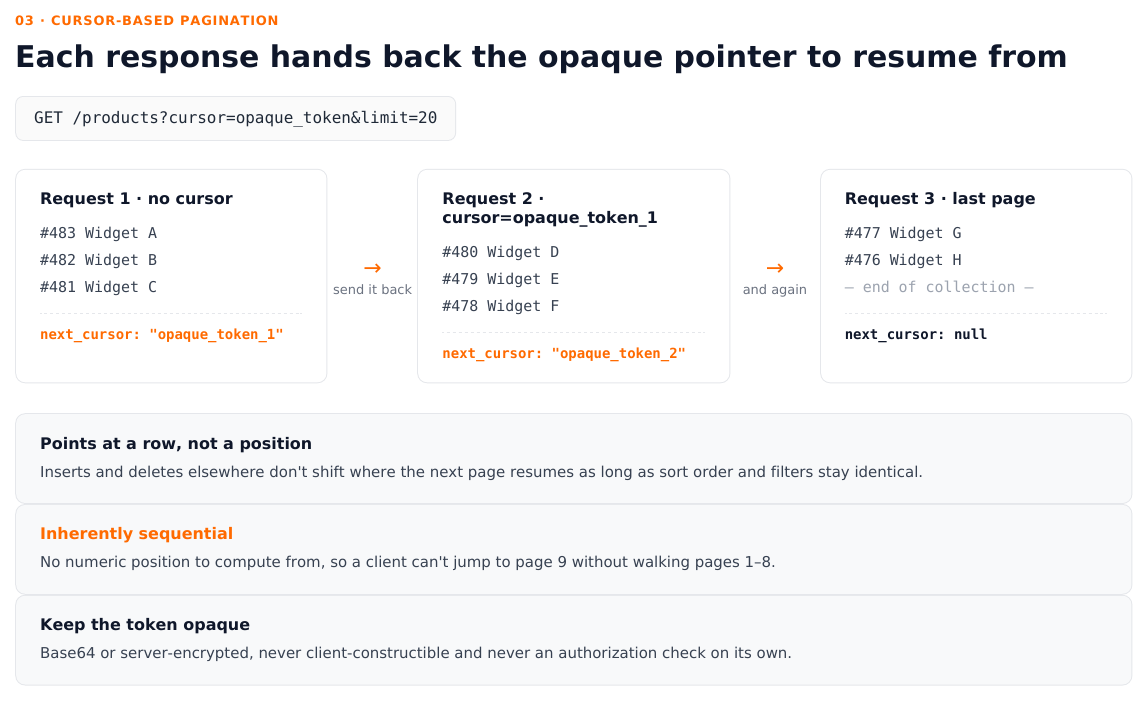
Cursor-based pagination identifies a page by an opaque pointer to a specific position in the result set, rather than a numeric offset. Each request carries a cursor returned by the previous response, for example GET /products?cursor=eyJpZCI6MTIzfQ&limit=20, and the server uses it to resume exactly where the last page ended. (A real cursor is a longer, non-obvious string, typically base64-encoded or encrypted on the server. Treat any cursor short enough to read at a glance as illustrative only.)
A typical response pairs the page of data with the token for the next page:
{
  "data": [
    { "id": 481, "name": "Widget A" },
    { "id": 480, "name": "Widget B" }
  ],
  "next_cursor": "opaque_token_2"
}
A next_cursor of null means there's nothing left to fetch. Because the cursor points at a specific row rather than a numeric position, an insertion or deletion elsewhere in the collection doesn't shift where the next page starts.
Still, a cursor is a continuation contract, not a snapshot guarantee. It tells the server "give me whatever comes after this point, in this sort order," and that only holds if the sort order and filters stay identical from one request to the next. A keyset implementation built on a stable, indexed sort key avoids offset pagination's position-shift problem. Even so, it can still miss or repeat a row if an existing row's sort value changes between fetches, or if a row is inserted before the client's current boundary.
If an endpoint truly needs to return every row exactly once regardless of concurrent writes, that's a stronger guarantee than any cursor provides on its own. It calls for an explicit, time-boxed snapshot or export job, built on real transaction isolation such as PostgreSQL's snapshot behavior under Repeatable Read, with a defined lifetime for how long the snapshot stays valid. Within those ordering assumptions, cursor pagination remains the standard choice for infinite-scroll feeds, high-write APIs, and any endpoint where clients read continuously while data is being written.
The trade-off is that cursors are inherently sequential. A client can't jump to "page 9" without first walking through pages 1 to 8, because there's no numeric position to calculate from.
4. Keyset (Seek) Pagination
Keyset, or "seek," pagination is a specific and highly efficient way to implement a cursor. The server finds the next page using a value taken directly from a sortable, indexed column (or combination of columns) in the last row returned, such as created_at and id, rather than an offset count. Nothing has to change for the client: the server can still wrap that value in an opaque token like any other cursor, so the public contract stays the same even though the query strategy underneath is different.
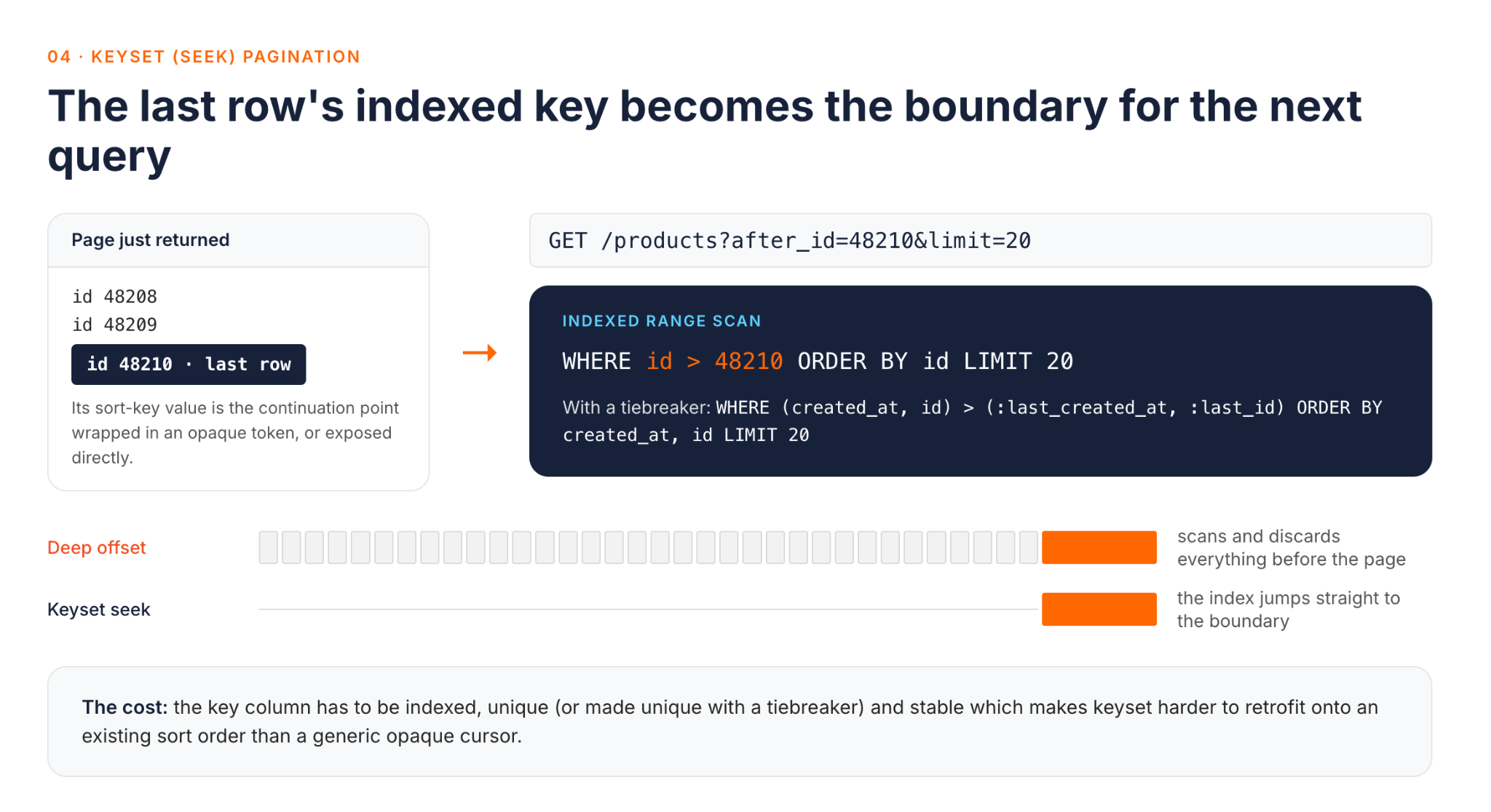
For illustration, exposing the raw value directly also works and makes the mechanism easier to see. A request like GET /products?after_id=48210&limit=20 becomes the query WHERE id > 48210 ORDER BY id LIMIT 20, which an index can satisfy directly. When the sort needs a tiebreaker, such as ordering by creation time, the same idea extends to a composite key:
WHERE (created_at, id) > (:last_created_at, :last_id)
ORDER BY created_at, id
LIMIT 20
Because it avoids the offset scan altogether, keyset pagination is usually the fastest of the four patterns at the scale where offset's scan-and-discard cost starts to dominate, provided the sort key is indexed and the query doesn't also require an expensive count or an unrelated filter. It shares cursor pagination's stability under concurrent writes for the same sort key. The cost is that the keyset column must be indexed, unique (or made unique with a tiebreaker), and stable, which makes keyset pagination harder to retrofit onto an existing sort order than a generic opaque cursor.
A fifth, narrower pattern is worth mentioning: time-based pagination, which pages through event or log data using a timestamp as the seek key. It's really a keyset variant limited to append-only, time-ordered data, and it's common in audit logs and activity feeds.
Choosing the Right Pagination Pattern
There's no single "best" pattern. The right choice depends on how your data behaves and what clients need to do with it:
- Is the dataset small and mostly static? Offset or page-based pagination is simple to build and easy for clients to understand, and the skipped-row problem barely matters when the data rarely changes.
- Does the client need to jump to an arbitrary page, such as "page 40 of 200"? Only offset and page-based pagination support that directly. Cursor and keyset pagination are inherently sequential.
- Is the dataset large, write-heavy, or read continuously, as with infinite scroll or sync jobs? Cursor or keyset pagination avoids skipped and duplicated rows and, with an indexed sort key, avoids the scan-and-discard cost that makes deep offsets slow.
- Is query performance at scale the main concern? Keyset pagination is the fastest option, because it uses an indexed range scan instead of scanning and discarding skipped rows, provided the sort key can be made stable and unique.
Many production APIs end up with a hybrid: page-based or offset pagination on read-heavy admin screens where jumping to a page matters, and cursor or keyset pagination on high-traffic collection endpoints where consistency and performance under write load matter more.
API Pagination Best Practices
- Use consistent parameter names across every endpoint. If one endpoint uses
cursorand another usespage_tokenfor the same concept, every client integration has to special-case it. Choose one vocabulary and apply it across the whole API. - Give clients an unambiguous way to tell when pagination is finished. At minimum, that's the value needed to fetch the next page, such as
next_cursorornext_page, where a missing or null value means there's nothing left. Atotal_countorhas_moreflag is a useful extra for clients that want it, but it isn't the essential part. - Keep cursors opaque, not client-constructible. Google's AIP-158 API design standard requires page tokens to be opaque, URL-safe strings that clients can't parse. Once clients can decode a cursor, its internal structure becomes part of your public API, and you can't change it later without breaking every client that depends on it. A cursor is a pointer into a specific sort order and filter set, not a credential. Keep the sort order and filters identical across requests that share a cursor, and never treat a valid-looking cursor as proof that the caller may see what it points to. Authorization still has to be checked on every request.
- Set sensible default and maximum page sizes. A default keeps simple requests fast, and a hard maximum stops a client from requesting an unreasonably large page in one call.
- Document pagination behavior in the API reference. Include parameter names, the default and maximum page sizes, and exactly what each metadata field means, so integrators don't have to work it out by trial and error.
Common Pagination Mistakes
Three mistakes account for most of the pagination bugs and incidents seen in production APIs.
1. Unbounded page sizes
An endpoint that accepts any limit a client sends, with no maximum, lets a single request ask for the entire table. That's a performance problem on a good day and a denial-of-service vector on a bad one. It's the kind of gap OWASP's API Security Top 10 calls Unrestricted Resource Consumption, so a maximum page size is a defensive control, not just a matter of tidiness.
2. Offset pagination on frequently changing data
Using offset or page-based pagination on a collection that's actively being written to, such as a live order queue or an activity feed, reliably produces the skipped-or-duplicated-record symptom described earlier. This is usually a design mismatch rather than a bug. Offset pagination is working as intended; it's just being applied to data it wasn't designed for.
3. Inconsistent pagination shapes across endpoints in the same API
When one collection endpoint returns {data, next_cursor} and another returns {results, page, total_pages}, every client that uses more than one endpoint has to write separate pagination logic for each. Standardizing the response envelope once, across all collection endpoints, removes a whole category of integration bugs.
Pagination in Practice: How WSO2 Implements It
Pagination design isn't only something we write about; WSO2 API Platform's own APIs use both of the main patterns covered above. The API Portal Management API uses offset pagination: collection endpoints accept limit and offset query parameters and return a pagination object with total, limit, and offset. The MCP Registry API uses cursor pagination instead. It returns up to 30 servers per page by default (100 at most, via limit), along with a metadata.nextCursor value that's simply absent on the last page. Each API keeps a single parameter and metadata shape across all its endpoints, which is exactly the consistency practice described above.
Pagination decisions don't stop at your own APIs, either. If you run a gateway in front of backend services you don't fully control, the gateway layer still has a part to play, although it takes more than one policy to cover it. Rate limiting controls how often a client can call an endpoint, but it doesn't cap how much a single call returns, so an oversized limit on an otherwise permitted request can still overload a backend. The gateway needs explicit page-size validation or a cap in addition to rate limiting, not instead of it. WSO2 API Platform doesn't ship a dedicated page-size policy, so this is a job for a custom gateway policy written in Go or Python.
Adding response caching in front of repeatedly fetched offset queries can meaningfully reduce backend load, but only if the cache is authorization-aware. A cached page must be scoped so that one caller's response is never served to another caller. Standard HTTP caching rules such as RFC 9111 help here: by default, a shared cache won't reuse a response to an authenticated request unless the response explicitly says that's safe.
There's also a measurement angle that's easy to overlook when a pagination scheme is first designed. WSO2's May 2025 acquisition of Moesif brought API usage analytics into the platform, and Moesif now powers WSO2 API Platform's analytics and monetization. It's the kind of tooling you can use to build your own analyses of how clients actually use a pagination scheme, such as typical page-size distributions, how often clients page beyond the first page, or whether requests to a cursor-based endpoint are abandoned partway through. These aren't dashboards that ship built in, but they give you a feedback loop for validating a pagination design against real traffic rather than assumptions made at design time.
API Pagination Checklist
Use this list when designing or reviewing a paginated endpoint:
- Every collection endpoint is paginated from the start; none return unbounded arrays.
- A default and a maximum page size are both enforced on the server.
- Pagination parameter names are consistent across every endpoint in the API.
- Every paginated response includes what's needed to fetch the next page, with a missing or null value meaning there's nothing left. A
total_countorhas_moreflag is a useful extra, not a requirement. - Cursors and tokens are opaque, can't be constructed or decoded by the client, and are never treated as an authorization check on their own.
- The same sort order and filters are used for every page fetched with a given cursor.
- The pattern matches how the data is written: offset or page-based for mostly static data, cursor or keyset for write-heavy or continuously read collections.
- Pagination behavior, including parameter names and metadata fields, is documented in the API reference.
Conclusion
Offset, page-based, cursor, and keyset pagination all solve the same underlying problem of bounding how much data an API returns per request, but they make different trade-offs between simplicity, jump-to-page support, and stability under concurrent writes. Match the pattern to how your data actually changes: offset or page-based for small, mostly static collections where jumping to an arbitrary page matters, and cursor or keyset for large or write-heavy collections where consistency and performance at scale matter more.
If you're standardizing pagination across APIs you don't fully control, or you want visibility into how clients actually page through your data in production, explore the WSO2 API Platform to see how gateway policies and usage analytics fit into that workflow.
Frequently Asked Questions
What is the purpose of pagination in an API?
Pagination limits the size of every collection response, so an API stays fast and predictable as the underlying dataset grows, instead of a single request having to return an entire table at once.
What exactly is pagination?
Pagination is splitting a large set of results into smaller, sequential pages that a client requests one at a time, using metadata such as a page number or cursor to move from one page to the next.
How do I implement pagination in a REST API?
Choose a pattern based on how the data changes: offset or page-based pagination for small or mostly static collections, and cursor or keyset pagination for large, write-heavy, or continuously read collections. Then return consistent pagination metadata, such as next_cursor or total_count, on every response.
What's the difference between cursor and keyset pagination?
Keyset pagination is a specific way to build a cursor. Instead of deriving the continuation point from an offset count, it derives it from the sortable, indexed column values of the last row returned. Clients can still receive that value wrapped in an opaque token; the difference lies in how the server finds the next page internally, not in what the client sees.

